
It loves to 'watch' you move


Play
The Vivofit wristband from Garmin nudges you to health, but shouldn't be riding a Bangkok bus
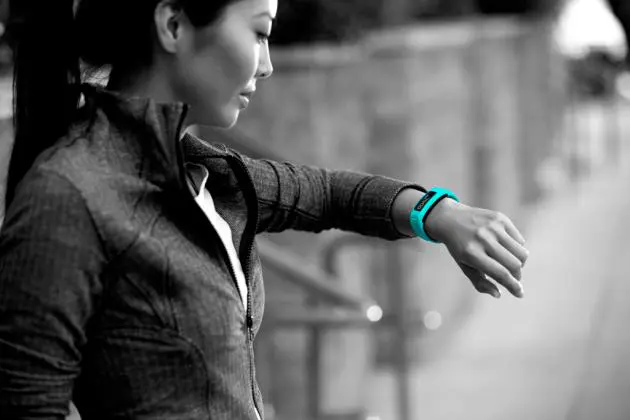
The Vivofit is a fitness wristband for office workers or anyone else who’s conscious about their health. It looks like a fashionable watch with a rectangular display, but it’s there to monitor your movement and remind you to stay active as much as possible, through the day.
At 25.5 grams the Vivofit is light and comfortable enough to wear around the clock. It’s just 21mm wide and 10.5mm thick. The length depends on the band size (S or L, 120 or 210mm).
The display itself is 25.5x10mm and the lettering it quite legible, so it’s easy to read the data on your daily activities. It calculates the number of steps you take and how many kilometres you walk right from getting out of bed, and how many calories you burn.
Manufacturer Garmin cites research that shows how prolonged periods of inactivity – such as sitting at a desk much of the day – decreases your production of fat-burning enzymes. The way to reverse that detriment is taking frequent, short walks throughout the day.
It’s easy for anyone who works at a desk to lose track of time and forget about moving around. The Vivofit will display a red “move” bar after an hour of inactivity and continue to do so every 15 minutes until you pay attention and talk a stroll. Get up and go check the fax machine or take a toilet break. Anything to get those legs in motion.
You can set goals, such as how many steps you want to take in a day. Once you’ve reached that goal, raise the level and you’ll soon be fit again. Such numbers are regarded as “estimates” because the number of steps and distance are calculated by the Vivofit’s built-in gyroscope system.
Its calculations are based on the device’s distance from the ground (it knows how tall you are because you’ve supplied that information when registering the software) and the impact it senses when your feet hit the ground.
I strapped on the Vivofit and went for a run, meanwhile measuring the distance via the GPS app on my phone. I did 10 kilometres. The Vivofit reckoned it was 13 kilometres, but it was likely counting my warm-up walk as well. The device also figured I’d covered 13,000 steps.
Setting up the Vivofit is quite intuitive. The tiny USB ANT+ wireless adapter that comes with it is plugged into your desktop or notebook computer. This is the same wireless protocol used in most health-monitoring devices. Download and install the Garmin Express software and switch on the Vivofit. Press and hold the button until the word “pair” appears and the wristband will link to the adapter via Garmin Express. Then log in to your Garmin Connect account or register for one.
On first use, you have to set up a profile, using any Android-based smartphone or an iPhone 4s or better. Select your gender and input your height, weight and birth date. Select an activity level: low, medium or high. If you’re moderate in your exercise, choose “medium” and the Vivofit will set your initial goal at 10,000 steps.
This was a goal I found easy to achieve because I normally walk a lot, including up and down the staircase to our office on the 31st floor. Interestingly, the wild, bumpy way public buses are driven in Bangkok actually added steps to my count. Compare that to my smooth daily bicycle rides, which added nothing to my step count – unless I swung my Vivofit wrist up and down while riding.
Clearly Garmin needs to somehow improve the device’s sensors or allow users to exclude certain situations from the step count.
The Vivofit will adjust your distance goal for the next day, gradually nudging you toward a healthier lifestyle. On the Garmin website you can earn virtual badges and view your progress on a daily, weekly or monthly basis. Once the profile is set and registered, you can easily synchronise the data collected to your account. Just press and hold the button until the word “sync” appears.
You can monitor your progress through the day by pressing the only button on the wristband that will cycle through six displays. It shows the number of steps, the number of steps remaining to reach your goal, the distance walked in kilometres or miles (again, your choice), the number of calories burned, and the current time.
The idea is to wear the Vivofit all day, so it’s water-resistant for showering and swimming.
When you go to bed, you put it in sleep mode by pressing and holding that same button until the word “sleep” appears. When you wake up, press it again to let it know you’re ready to go. It will tell you if you’ve a sound sleep, using a graph that also appears on the main page of your Garmin account, as part of the complete picture of your progress.
You can organise your home page to show the data that’s most important to you and join in online challenges to earn badges for extra motivation, connecting, competing and comparing with friends and family around the world.
The Garmin Vivofit is highly recommended if you’re concerned about your health. It’s available in black, grey, green, blue and purple for Bt4,800. The strap is easily changed as needed.
KEY SPECS
Unit dimensions: 21 x10.5mm
Band sizes: (S: 4.7-6.9 inches/ 120-175mm, L: 6.0-8.3 inches/152-210mm)
Display size: 25.5x10mm
Weight: 25.5g
Battery: Two replaceable CR 1632 coin cells
Battery life: More than a year
GPS-enabled: No
Water resistance: Up to 50m
History: Stores more than one month of 24/7 activity data on the device without sync
Heart-rate monitor compatible: Yes
Wireless sync: Bluetooth Smart technology or USB ANT Stick
