
Smile, you're on candid camera


Play
A home security camera is a great idea for anyone needing to monitor a baby or an elderly relative
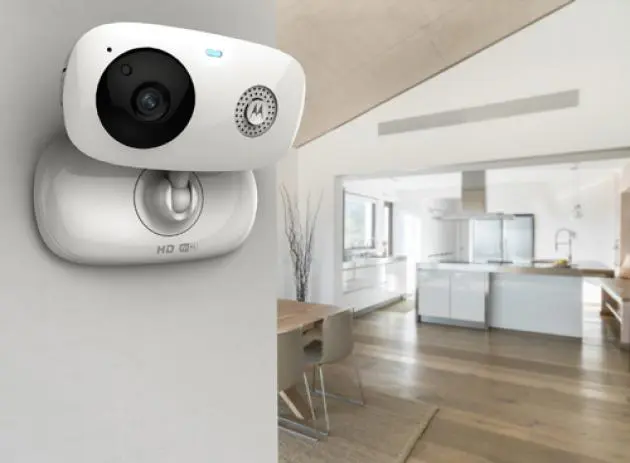
A SECURITY CAMERA for home use that’s handy for monitoring a child or a vulnerable elderly parent, the new Motorola Focus 66 WiFi HD is a security camera with a built-in microphone and speaker that can also been used as a walkie-talkie.
It provides real-time alerts to your smartphone or tablet computer when it detects motions, sounds or changes in temperature.
The camera, which comes in a compact size, features 720p HD video feeds and has a Wi-Fi network connection so it is really easy to set up. The installation can be done in just five minutes.
You must first download and install the Hubble for Motorola Monitor App, which is available for both Android and iOS devices.
You then use the app to register for a free Motorola Monitors Hubble account. That done, you use the app to add the Focus 66 WiFi HD to your account. You need to press the pair button on the camera for three seconds. After that the app on your smartphone will detect it and add it to your account.
The app then guides you to link the camera to your Wi-Fi router by having you click on your router name and enter the Wi-Fi connection password. If you have several rooms, you can add more Focus 66 WiFi HD cameras to your account for monitoring.
The camera has a speaker and microphone at the front. The app provides a function for walkie-talkie style communication. All you need do it press the talk button once to speak and press it again to listen.
The app also provides a function tab for you to select one of five melodies if you are using the camera to monitor your baby so that the little one can enjoy the music.
Tap on a function tab to bring up the video/photo recording mode. When this mode is activated, you can choose whether to shoot still photos or record video clips. The clips will be stored on your phone’s internal or memory card so bear in mind that the memory could be used up fast.
You can of course use your PC or notebook computer to monitor the security camera and record the feeds to your computer’s hard disk. You must simply go to www.HubbleConnected.com/motorola/login/ and enter your user name and password to log in.
You also use the website to change the settings or your camera and account as well by following the menu instruction steps.
The camera has temperature sensor at the back so you can use it as thermometer as well. It will report the current temperature in the room where the camera is located in either Fahrenheit or Celsius. You can set a temperature range and the camera will send an alert to your phone if the temperature drops lower than or increase higher than the range.
The camera has a light sensor for night mode detection and infrared leds for night vision as well.
The feed from the camera has a 10-second delay and because the alerts are sent by the camera via the Hubble server, your mobile device must remain connected to the Internet. Setting up the camera for the test was a breeze. The quality of video feed was clear and the sound was loud and clear. The 62-degree angle lens of the camera provided a good field of vision.
The camera sent alerts to my phone and briefly recorded the events when there were sounds or movements. When the camera’s internal memory was full, the app prompted me to delete the events.
Feeds from the camera can be watched from several devices using the same account.
The Motorola Focus 66 WiFi HD” is available for Bt3,490 and comes in black and white. You’ll find at Jaymart, Powerbuy, Powermall and leading stores |countrywide.
n Resolution: 720p
n Wi-Fi: 802.11 b/g/n
n Image sensor: |Colour CMOS 1M Pixels
n Lens: f = 2.3 mm, F = 2.4
n IR LED: 7 pcs
n Power Adapter: Ten Pao International, Input: 100-240Vac, 50/60Hz, 300mA, Output: 5Vdc, 1000mA
System Requirements: |Web Portal
n Windows systems: 7 or 8 (Java browser plug-in needed)
n Mac OS version: 10.7 or above
n Internet Explorer version: 8.0 or above
n Firefox version: 11.0 or above
n Chrome version: 18.0 or above
n Safari version: 5.1 or above
n Java version: 7 or above
n Android System: |Version 4.0 or above
n iPhone/iPad iOS: |Version 7.0 or above
