
Silent on the Surface


Play
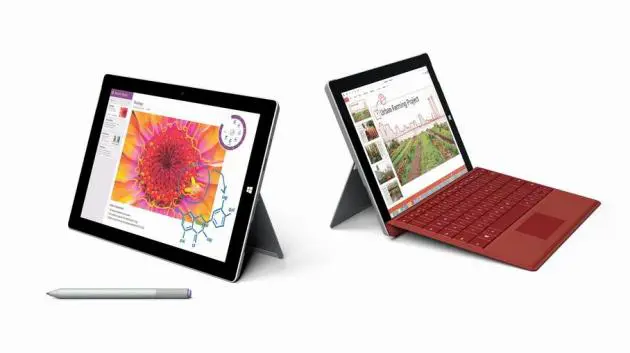
Lightweight, slim and very portable, the new Surface 3 tablet from Microsoft packs plenty of punch
A LIGHT and thin tablet computer powerful enough for handling general desktop applications as well as business applications, the Microsoft Surface 3 will appeal to both students and professionals.
Cheaper than the top-of-the-range Surface Pro 3, it’s easy to carry around, weighing in at just 622 grams excluding the optional keyboard cover.
The tablet owes its skinny and noiseless appeal to the fact that it has a fan-less design, unlike the much more expensive Surface Pro 3, which is powered by the Intel Core i7 processor. The Surface 3 gets its power from the Quad-core Intel Atom x7-Z8700 processor 1.6 GHz, which is powerful enough to handle most computing tasks.
Surface 3 runs on Microsoft Windows 8.1 and comes pre-loaded with the Office 365 Personal application suite, including Outlook, Word, Excel, PowerPoint and OneNote, which is valid for a year.
Boasting a strong magnesium body in sleek silver, it has two physical buttons – volume and power – as well as a touch-sensitive home button.
The tablet has beautiful 10.8-inch ClearType Full HD display with 1920 x 1280-pixel resolution and comes with a 3.5 megapixel-front-facing camera and 8-megapixel rear camera. Both are capable of shooting 1080p video.
All the necessary ports are there – a full-size USB 3.0 port, a mini DisplayPort and a micro USB charging port that also supports USB 2.0 data connection.
The tablet also comes with fastest Wi-Fi connection of 802.11 ac and is compatible with 802.11 a/b/g/n.
Two models are on offer, each with a different active memory and storage – 2 GB RAM and 64 GB storage and 4 GB RAM and 128 GB storage.
I tested the 4 GB model and found that the Surface 3 had pleasing performance. It handled general computing tasks well, which should suffice for students, and the Word application ran fast and smoothly.
Its touch screen was very responsive and scrolling was fast.
The tablet took about 19 seconds to start up and 4 seconds to shut down.
Three accessories are available from Microsoft Thailand. They are the Surface 3 Type Cover, which functions as an efficient keyboard and a front cover available in blue, bright blue, red, bright red, black and purple for Bt4,490.
The Surface Pen in blue, red, black and silver options costs Bt1,790.
There is also a Surface 3 Docking Station that provides two more USB 3.0 ports, a gigabit Ethernet port, a mini DisplayPort output, 3.5mm audio input/output, a security lock slot and a Surface Pen storage. It retails for Bt7,190.
Surface 3 with 2 GB of RAM and 64 GB of storage retails for Bt17,400. The more powerful version with 4 GB of RAM and 128 GB of storage is priced at Bt21,400.
Key Specs
- Operating system: Windows 8.1
- Display: 10.8-inch ClearType Full HD Plus Display with 1920 x 1280 pixel resolutions in 3:2 aspect ratio
- CPU: Quad-core Intel Atom x7-Z8700 processor 1.6 GHz
- Storage: 64/128 GB
- Memory: 2/4 GB
- Wireless connectivity Wi-Fi (802.11 a/b/g/n/ac), Bluetooth 4.0 low energy
- Battery: Up to 10 hours of video-playback battery life
- Cameras: 3.5 megapixel 1080p front-facing camera, 8.0 megapixel 1080p rear-facing camera with auto-focus
- A/V: Microphone, Stereo speakers with Dolby Audio-enhanced sound
- Ports: Full-size USB 3.0, Mini DisplayPort, Micro USB charging port (passes power and USB 2.0 data), Headset jack, Cover port
n Sensors: Ambient light sensor, Proximity sensor, Accelerometer, Gyroscope, Magnetometer, Digital compass
- Power supply: 13W Micro USB power supply
- Dimensions: 267 x 187 x 8.7 mm
- Weight: 622 grams
