
Travelling through the 'Portal of Power'


Play
LG brings the popular game to its Smart TV
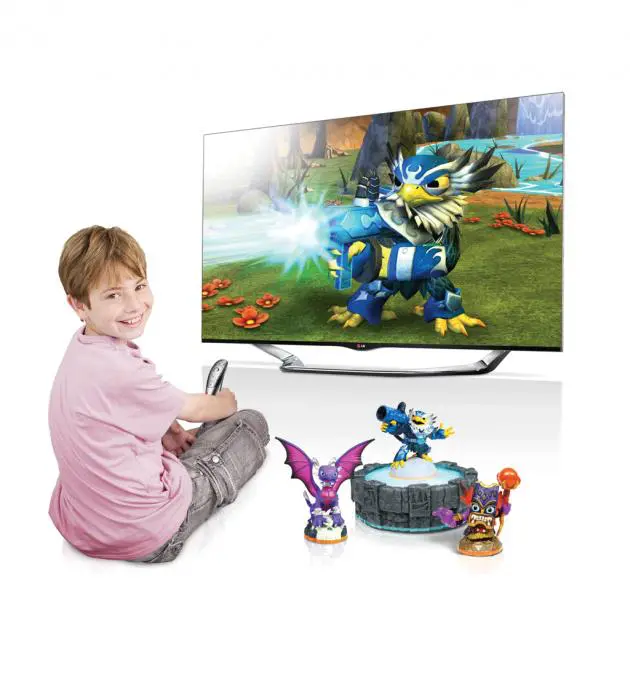
There’s good news for owners of the new LG Cinema 3D Smart TV. They can now while the hours away not by watching news, documentaries or movies, but by playing the popular fighting role-playing game, Skylanders Battlegrounds, on their TVs.
Even better, LG is bundling a set of game hardware, comprising a Portal of Power and three Skylanders figures, with its LA series of the Smart TV from the 47-inch model up, meaning that each TV buyer gets different Skylanders figures, which have different power and abilities.
The Portal of Power is a USB connector that plugs into a USB port of an LG Smart TV to allow you to load the three characters to use in the game.
A hit mobile game, Skylanders Battlegrounds has been specially adapted for LG Smart TV and can be played using the Magic Remote that comes with the LG Smart TVs.
It’s an action role-playing game in which players must select two game characters to form a team to fight against monsters in the fantasy world.
The characters will gradually learn new fighting skills and accumulate experience as well as magical abilities so as to be able to beat more powerful enemies as the game unfolds. The game provides an innovative tie-up between toy figures, which are bundled with the TVs and the onscreen game play that is unique to the Skylanders franchise.
The Magic Remote provides a cursor on the TV screen, which is just like a mouse cursor on the computer screen and comes up when you point the remote at the TV. With precise motion sensors, an easy-to-use scroll wheel and conveniently positioned directional keys, the Magic Remote is good for controlling all the game’s exciting actions.
And the Skylanders Battlegrounds for LG Smart TV allow its fans to play with any character from the entire collection of Skylanders figures, including the latest instalment in the popular franchise, Skylanders SWAP Force.
I tried the game on the 55-inch LG Cinema 3D Smart TV LA7400 and had great fun thanks to the enjoyable graphics and good sound effects.
To play the game on the LG Smart TV, you will need to have an ID to allow you to connect with LG Smart World and download the game. You can register for an LG ID right away on the LA7400, which actually functions like a computer with a built-in web browser. You can even activate the ID sent to your mail by logging on to your email account on the web browser that comes with the LG Smart TV.
You then enter the LG Smart World’s Game World on the TV to download the game. It’s a massive 1GB file so takes time to download and install. When you run the game for the first time, it will lead you to the tutorial so that you can familiarise with how to control the game using the Magic Remote.
The game world is divided into tiles. Point the cursor to the adjacent tile and click on it by pressing the middle of the scroll wheel to bring your character to the tile.
During the game, you will collect jewels and gold coins. The jewels can be used to purchase more game characters and slots for carrying game items, such as healing potions and weapons. You will need the coins to buy items to add more abilities to your characters.
You will be prompted to select two characters to form a team for adventuring in the game world.
The game’s characters that you can purchase to form your team are divided into groups of elements, such as fire, water, wind and tech. The game also sets the element of the day that will give you extra coins provided you use it that day.
When your characters arrive at a tile where monsters are residing, the game will load the battle arena where you will fight against the monsters. Again, the loading takes time.
You control the fight by clicking at one of your characters and then point and click to a monster. Then, you will do the same with the other character. The two characters will then keep on fighting until they win. If you do not assign your characters to fight, they will be attacked by the monsters without putting up any resistance.
The fun starts after the tutorial is completed. You can then connect the Portal of Power to the TV, Once the icon turns blue, place one of three Skylanders toy figures on the portal and its character will appear on the TV screen for you to select as your team. Then, you can select the second team member in the same way.
After you complete a battle, your characters will gain experience and you will receive coins and jewels. Before you select a game level to play, you can enter the Item Shop to buy items to boost your characters’ abilities. The game has 40 levels at which you can complete.
Skylanders Battlegrounds can be played only on the 2013 series of LG Smart TVs that come with the Magic Remote.
Key specs
_ Game requirements: LG Smart TV, 2013 series Magic Remote Internet Connection(either LAN or Wi-fi)
