
Mini media with a big plus


Play
The compact Asus O!Play Mini Plus is great for watching online HD movies on a big screen without breaking the bank
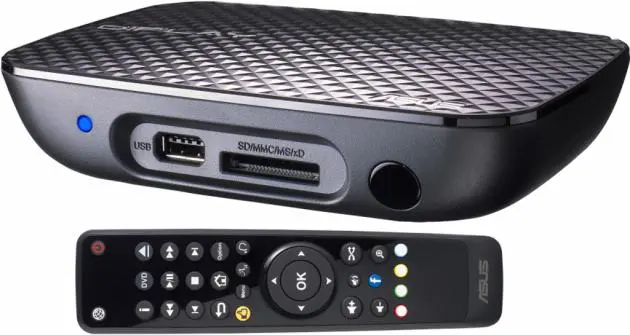
Anew compact high-definition media player that measures just 151.85 x 106.7 x 29.03 mm, the Asus O!Play Mini Plus allows you to enjoy online entertainment media and lets you stream music and video files from your computer to enjoy on your home theatre system too.
It’s even easy to set up. You simply connect the provided HDMI cable to your HD TV or your home theatre receiver and connect the player to your USB-based hard drive or an e-SATA-based hard drive and you can enjoy playing movies, music files or viewing photos right away.
It has a built-in Wi-Fi 802.11 b/g/n adapter so it can connect to your home network in a breeze. A Gigabit LAN port is also provided if you prefer a faster wired network connection.
Apart from USB and e-SATA ports for connecting hard drives or USB flash drive, you can also attach SD, xD, MMC or MS memory cards to the 4-in-1 card reader on the front panel of the player to enjoy the multimedia files stored on the card.
The player is powered by powerful Realtek 1185 chipset.
I tested the O!Play Mini Plus on my Sony Full-HD LCD TV as well as a Samsung Full-HD Plasma TV. The player displayed beautiful and sharp movies on both sets. The 720p HD videos on a USB portable hard drive played smoothly.
I also streamed the 1080p Avatar movie from my notebook computer to the O!Play Mini Plus and the movie was sharp, clear and beautiful. However, some parts of the movie kept skipping apparently because both the notebook and O!Play Mini Plus were connected to my home network using a wireless connection. Asus recommends that you use a Gigabit wire connection to stream full HD movie from computer to player. However, the streaming of standard-definition movie during the test went smoothly and Thai subtitles were displayed correctly during the test.
O!Play Mini Plus also supports video plug-n-play. You need to create an “AutoPlay” folder in your storage device, copy your video files to the folder and plug it to the O!Play Mini Plus and the videos will play automatically on your HDTV.
O!Play Mini Plus can also connect to several online entertainment and social networking sites.
From its online menu, just connect to IPTV stations and Internet Radio stations whose links have been organised and complied by Muzee portal network.
You can also connect to photo-sharing sites of Picasa and Flick, check online stock from Yahoo! Finance, update yourself with weather reports from Yahoo! Weather and read RSS news feeds, such as BBC News.
O!Play Mini Plus can also stream video clips from YouTube and Dailymotion.
Facebook fans will be pleased happy that O!Play Mini Plus can connect to the social networking site. But since it has no keyboard, you will need to use the remote control to move around the on-screen keyboard to select the characters of your username and word for logging on to your Facebook account. Fortunately, the O!Play Mini Plus can remember your username and password for the next time.
After you have logged on to your Facebook account, you can select to allow Asus’ O!Play app to access your account so that you can easily view photos of your Facebook in slideshows.
Asus O!Play Mini Plus retails for Bt4,590.
Key specs
_ Chipset: Realtek 1185
_ Supported Video: MPEG1, MPEG2, MPEG4, RM, RMVB, VC-1, H.264
_ Supported Video File Extension: TRP, MP4, MOV, AVI, ASF, WMV, MKV, FLV, TS, MTS, M2TS, DAT, MPG, VOB, ISO
_ Supported Audio: MP3, WAV, AAC, OGG, FLAC, AIFF, Dolby Digital AC3, Dolby Digital Plus, DTS 2.0 +Digital out, Dolby True HD (Passthrough), Dolby True HD (Decoding), Tag ID3; Image : JPEG, BMP, PNG, GIF, TIFF
_ File Systems: FAT16/32, NTFS, HFS/HFS+, EXT3
_ Subtitle: SRT, SUB, SMI, SSA, TXT
_ Inputs: 1 x USB 2.0 Port, 1 x USB 2.0 / eSATA Combo Port, 1 x RJ-45 LAN Port(Gigabits MBps), 4 -in-1 Card Readers (SD/ MS/ xD/ MMC)
_ Outputs: Composite Video, Composite Audio L/R, S/PDIF Out (Optical), HDMI 1.3
_ Wireless Technology: WiFi 802.11 b/g/n
_ Accessories: AC Adapter, Plug, Remote Control, Composite A/V Cable, Quick Start Guide, CD (User Manual)
_ Dimensions: 151.85 x 106.7 x 29.03 mm (WxDxH)
_ Weight: 175 g
