
On the road with Garmin


Play
A new GPS device efficiently and quickly guides you to your destination though it definitely doesn't prefer the scenic route
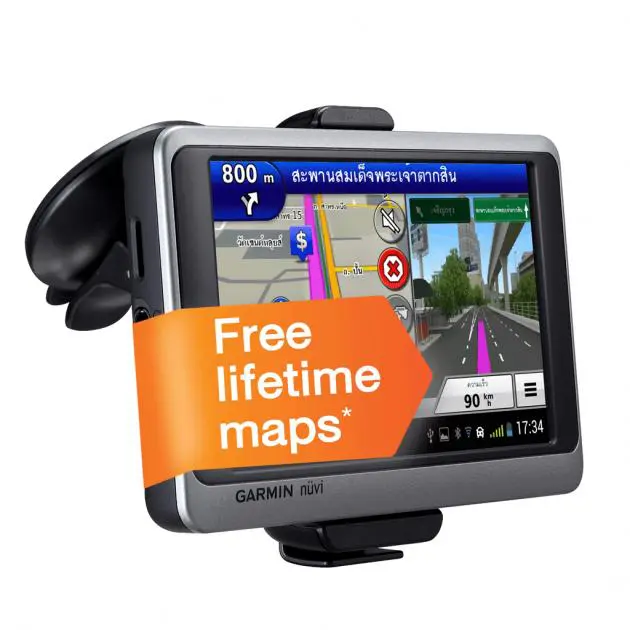
Garmin makes its Google Android debut with a GPS device – the Nuvi 3592LM – that should ensure you don’t get lost again.
Easy to use thanks to its touch-screen and several useful functions, the Nuvi leads you turn by turn with both a detailed map and navigation voice (in Thai) to your destination.
With a 5-inch TFT display in 800 x 480 pixel resolution and running on Google Android OS, you can use it as a tablet.
It has a built-in flash memory of 8 gigabytes, expandable with a microSD card and Wi-Fi 802.11b/g/n connectivity, meaning you can connect it to a Wi-Fi hotspot or share the Internet connection from your smartphone by using the Nuvi 3592LM as an Android tablet. You can browse web pages, search Google for more information or sightseeing places, connect with your Facebook friends or check mail as well as play music and video files.
Moreover, the GPS navigator has a Bluetooth connection so you can use it as a hand-free speaker phone system.
Searching for a destination is easy. Start the Garmin map and all points of interest around you will be shown on the map. Tap on a point of interest and the navigator will display its name and a navigation button to guide you to the spot without having to leave the map function. And when you request a navigation guide, you can select whether you’re walking or driving to the spot.
You can also use Gamin Navigation search to locate your destination by typing the name of the place or select one from a category that lists foods shops and restaurants, petrol stations, shopping places, banks, ATMs, intersections, car parks, tourist service posts, hotels, hospitals, points of interest, entertainment places, and so on. Or you can search by phone number of the place you want to go, such as a popular restaurant. If you know the GPS coordinate figures, key in them to have the navigation device guide you there.
These points of interest, such as ATMs, banks, hotels, hospitals and petrol stations as well as 7Eleven shops are also shown on the map, in case you urgently need their services.
The map also displays important or famous buildings and locations in 3D. It uses the photoReal Junction View feature that sees a photo pop up of the major junction you’re approaching complete with direction lines to ensure you enter the correct lane for making a right turn or exiting/entering the highway or expressway. This feature makes approaching unfamiliar intersections or exits a dream,
Another nice feature is the trip planner function. This function allows you to save 100 routes and 1,000 destinations by simulating the navigation and turns on the device before taking to the road.
The highway mode, which displays the navigation map while you are driving, gives you the name of the current road or highway, the distance to the spot where you have to make a turn, your current speed and even estimates the time it will take to reach your destination. It tells you your fastest speed in the current trip and warns you of traffic lights coming up at the intersection ahead.
When you are driving on an expressway, the highway mode will also display exits that you can use. If there are several, use the up and down arrow to scroll through them.
The package comes with a vehicle suction-cup that allows you to mount the navigator on the windshield. There is also a vehicle power cable – a must because the navigation mode can use up the battery in about two hours.
I tested the Nuvi 3592LM by having it guide me to the popular Kob Seafood restaurant in the Klong Kone area of Samut Songkhram. The restaurant is located in a complicated rural road network off the Rama II highway and I believe it would have been hard to find it without the Garmin navigator.
The Nuvi 3592LM guided us turn by turn and we reached the restaurant without putting a wheel wrong.
I was able to set the destination point by simply searching with the phone number and tapping “navigation button”. The Nuvi 3592LM guided us from Soi Pattanakarn 65 to Onnuj Road then to Srinakarin Road, picking up the Bang Phli-Rama II elevated express way. The navigation system even knew about the recently constructed tunnel at the Udomsuk Intersection and told us to use it.
It wasn’t so aware of the elevated bridges under construction at the Pattanakarn-Onnuj Intersection though and told us to make a right turn, which couldn’t be done as the turn is closed to traffic. We were however able to take a left then make a u-turn and the Nuvi 3592LM quickly recalculated the route.
Leaving the restaurant, I set the navigator to lead us to Cha-am beach, hoping to ride on the scenic Klong Kone-Cha-am seaside road. However, the navigator tried to guide us back to Rama II Road so we overrode it, turning left into the road that runs between Klong Kone and Cha-am Road. Once again, the navigator recalculated the route and guided us onwards. It got a little confused at certain junctions, however, apparently determined to guide us back to the main road.
It’s worth remembering that if there is more than one way of getting to your destination, the Nuvi 3592LM will guide you to the main road. You can either, as we did, override its suggestion or use the trip planner function to navigate and set your desired route first.
Garmin Nuvi 3592LM is distributed by Esri Thailand for Bt13,500. You can buy an additional GTM 35 traffic condition receiver for Bt2,500 to monitor the traffic situation in real time.
Key specs:
Geographic Coordinate System: WGS-84 (global standard)
Antenna: Built-in antenna
Power Source: Rechargeable lithium-ion
Connection: miniUSB (USB 2.0), Wi-Fi802.11b/g/n), Bluetooth
Display: 5-inch TFT LCD (diagonal), 800 x 480 pixels (supports two-point multi-touch input)
Built-in Memory: 8G NAND Flash (available storage capacity of 6GB)
Data Card: microSD card (supports SDHC)
AV In: 3.5 mm. x 2 (1 AV-in at device unit and 1 Video-in at device mount)
Audio Out: 3.5 mm.
Battery Life: Normal: Up to 2 hours when backlight is set at 50%
Sleep: Up to 7 days in standby mode
In The Box: Nuvi 3592LM, Vehicle suction cup mount. Vehicle power cable, USB cable, Wall charger, Quick start manual
Unit dimensions: 13.7 x 8.63 x 1.68 cm.
Weight: Approx. 262 g.
