
This router's also a speedy modem


Play
The X3500 from Linksys is easily set up to pull double duty without blinking
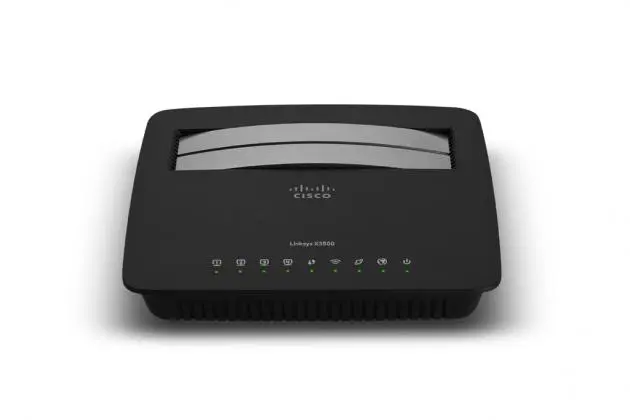
Linksys X3500 is an all-in-one ADSL2+ modem/router with a convenient USB port and fast wireless connection.
Unlike other DSL modems, the X3500 can double as a router for a cable-modem connection. It has both a telephone-jack port for connecting to your ADSL line and a Ethernet WAN port to a cable modem for connecting to a cable modem. This means that, when you switch from ADSL service to cable-modem service, you won’t have to buy a new router.
As a router, X3500 provides fast connections of four-gigabit Ethernet ports for speeds 10 times faster than Ethernet. For wireless connection, it features wireless N technology, offering fast speed to connect your computers, Internet-ready TVs, game consoles and other Wi-Fi devices at transfer rates up to 300 + 450Mbps for an optimal home-network experience.
The router provides reliable wireless coverage with MIMO (multiple-input and multiple-output) antenna technology that establishes broad coverage so you can enjoy your wireless network from anywhere in your home. It has built-in 2x2 2.4GHz antennas and 3x3 5GHz antennas that perform functions of transmitters and receivers.
It uses Dual-Band N (2.4 and 5GHz) to double your network bandwidth. The dual-band design avoids interference and maximises throughput because your gadgets that are capable of riding 5GHz bandwidth will leave the 2.4GHz bandwidth for the rest of your gadgets. So you will be able to steam HD videos and transfer files at high speed and play games without disruption.
The router also uses advanced security features such as WPA2 wireless encryption and an integrated firewall to keep your network protected.
Best of all, the X3500 comes with a USB port that allows you to conveniently set up a DLNA-certified (Digital Living Network Alliance) media server without having to perform complicated network settings.
You can simply plug in your USB external hard drive to the port and it automatically turns into a media server with the built-in DLNA media server function, enabling media streaming to your TV, Xbox 360, PS3 or other DLNA-compatible devices.
Or you can connect your printer to the USB port and share it with several desktop and notebook computers without the need to do complicated print-server settings.
During the test I connected my Canon E600 multifunction printer to X3500’s USB port and installed Cisco VUSB utility on all computers and then I could print from the computers to the printer. I could even scan documents to the computers using the VUSB utility.
The X3500 is also built for the future, providing support to the future IPv6 protocol.
It was a breeze to set up the X3500 during the test. The package comes with a set-up CD that will guide you step by step.
But since I know the ADSL connection settings of True Internet, my Internet provider, I opted to set up the modem and router manually, a process I found not complicated at all.
I simply typed the modem’s default address (192.168.1.1) and keyed in the factory’s setting username and password of the modem to bring in the easy-to-understand set-up page. After I selected the proper connection-protocol setting and typed in my username and password of my True Internet account, the modem managed to connect to True Internet’s server with no problem.
I checked the speeds and found that I had full download speed of 10.32Mbps or the full download capacity of my account and the upload speed of 882kbps, which was faster than my previous modem.
Then I set the wireless connection setting for the router by changing its SSID (Service set identification) and password to be the same with those of my previous router. So all my devices could automatically connect to the router without having to make changes on individual notebook or mobile phone or other devices. Then, all the devices were back online without a hitch.
The X3500 has good range and signal strength. I found that my notebook computer reported a full five-mark level of signal strength in a bedroom on the second floor. The X3500 was positioned on the ground floor. On the rooftop, which is equivalent to the third floor, the notebook reported that the signal strength dropped to three out of five levels but it was still strong.
Linksys X3500 has a suggested retail price of about Bt5,200.
KEY SPECS
Technology: Wireless-N
Bands: 2.4GHz & 5GHz
2.4GHz Frequency Range: 2400 to 2483.5MHz
5GHz Frequency range: 5150 to 5250MHz
Transmit/Receive: 2x2 (2.4GHz) & 3x3 (5GHz)
Antennas: 2x2 (2.4GHz) & 3x3 (5GHz) internal
Ports: 4 x Gigabit LAN, 1 x Gigabit WAN, 1 x DSL
IPv6 Support: Native IPv6 and 6rd support
OS Compatibility: Windows, Mac
Minimum System Requirements:
Web Browser: Internet Explorer 7, Safari 4 or Firefox 3 or higher for optional browser-based configuration
PC: Wi-Fi enabled PC with CD or DVD drive, running Windows XP SP3, Windows Vista SP1 or later, Windows 7 or Windows 8
Mac: Wi-Fi enabled Mac with CD or DVD drive, running OS X Leopard 10.5 or Snow Leopard 10.6 or later, or Lion 10.7 or later
Package Contents: Linksys X3500 Dual-Band Wireless Router with ADSL2+ Modem and USBCD-ROM with Cisco Connect Software and Resources, Ethernet cable, Telephone cable, Quick Start Guide, Power adapter, ADSL microfilter
