
Kaspersky puts a cap on crime


Play
Internet Security 2015 installs a multitude of safeguards on your home computer
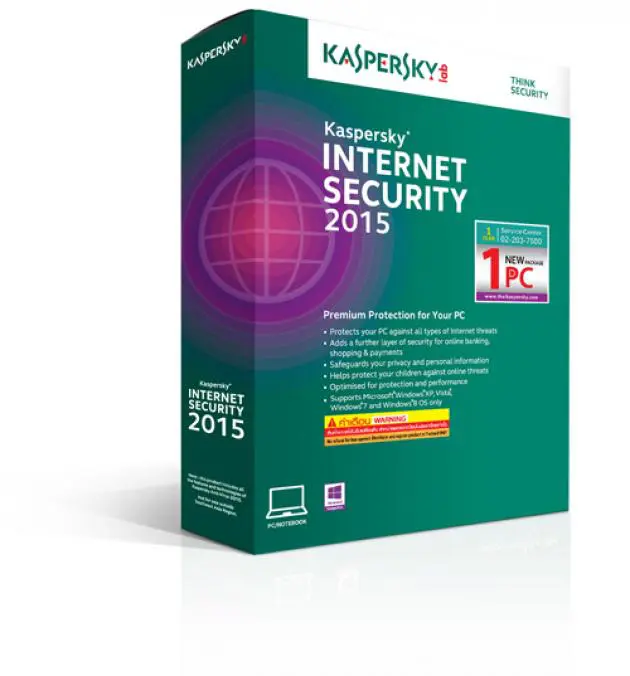
KASPERSKY Internet Security 2015 can give you peace of mind while using your computer – and while your kid is using it.
It gives you protection against malware, identity theft and phishing, as well as securing your data and your money while you bank and shop online. It also provides advanced parental control.
Kaspersky Internet Security 2015 can protect your computer against computer viruses, worms, Trojan viruses, spyware, rootkits, bots and more. Its latest anti-malware engine stays up to date by using cloud-based Kaspersky Security Network to continually gather information about fresh threats from millions of consenting users’ computers. There’s never any waiting period for a new malware signature to be added to the database.
Trusted Applications Mode, based on Kaspersky’s Whitelisting Service, decides which applications are allowed to run on your PC. Once enable, it blocks all applications that don’t carry its “trusted” designation.
Protection is also built in against “blocker” Trojan viruses that prevent you from using your PC until you pay “ransom” money. Any dangerous processes will be halted and necessary treatment procedures launched when a cyber-criminal tries to take control.
Safe Money technology protects your cash transactions and your personal information whenever you log in to an online bank, payment-system website or shopping site. It compares the site’s URL against a database of secure sites and checks the certificate used to set up the secure connection to prevent you being directed to a fake site.
It also checks your PC for any operating-system vulnerabilities that could affect online banking and automatically offers to open the targeted site in Safe Money mode for an extra level of security.
Secure Keyboard and Virtual Keyboard are two “special” keyboard modes that prevent against remote efforts to use “keylogger” programmes and screen-capture malware to record the keys you press when entering your bank-account details, credit card number or other valuable information.
When you visit a bank or payment website or enter a password within any Web page, Secure Keyboard is automatically activated, ensuring that you can enter data safely. Virtual Keyboard lets you use mouse clicks to enter data so your information can’t be tracked or stolen by hackers.
In my test I found that installing the software was a breeze. I tested the security program on a Lenovo Yoga 3 Pro and noticed no change in the computer’s performance. Kaspersky Lab says Internet Security 2015 has minimal impact on network activity and the launch of browsers and applications.
The software comes on a CD along with a manual and a scratch card. After installing the software, I used the serial number from the scratch card to register for an activation code at www.ThaiKaspersky.com. You have to provide your name, address, phone number and email address. The activation code was sent as an SMS to my phone. Once the code was keyed in, the installation was completed.
The programme then spent several minutes updating its application modules and virus database, and then it was ready to protect my computer against all malware.
The home menu shows four major functions – Scan, Update, Safe Money and Parent Control.
Parent Control is very handy for making sure your children take a safe and disciplined approach to using the Internet. You must first set a password to configure it so that your child can’t change your restrictions later.
Among other things, Parental Control will block access to the computer during certain hours of the day and limit its use for the number of hours you deem appropriate. Restrictions can be different for weekdays and weekends. You can even set time breaks every few hours and even the length of the break, thus ensuring that your kid gives his eyes an occasional rest.
You can block access to games according to age rating and keep out adult entertainment altogether. Ban specific applications like download and torrent managers and instant messengers as well, if you like. Block messaging with certain contacts. You might even want to control the use of key words in messages and Web forms.
Click on Show Additional Tools at the bottom corner of the main screen to see other worthwhile concepts, including Virtual Keyboard, Privacy Cleaner and Kaspersky Rescue Disk.
Here too is listed the usage details for computer, memory and disk, as well as bandwidth usage, where you can spot extraordinary high numbers that may be caused by malware.
Icom Tech distributes Kaspersky Internet Security 2015 in Thailand. It costs Bt890 per year, or Bt1,780 for three users.
Operating systems supported:
n Microsoft Windows XP |Home Edition |(Service Pack 3 or higher)
n Microsoft Windows XP Professional (32-bit) |(Service Pack 3 or higher)
n Microsoft Windows XP Professional (64-bit) |(Service Pack 2 or higher)
n Microsoft Windows Vista Home Basic (32-bit/64-bit) (Service Pack 1)
n Microsoft Windows Vista Home Premium (32-bit/64-bit) (Service Pack 1)
n Microsoft Windows Vista Business (32-bit/64-bit) (Service Pack 1)
n Microsoft Windows Vista Enterprise (32-bit/64-bit) (Service Pack 1)
n Microsoft Windows Vista Ultimate (32-bit/64-bit) (Service Pack 1)
n Microsoft Windows 7 |Starter (32-bit)
n Microsoft Windows 7 Home Basic (32-bit/64-bit)
n Microsoft Windows 7 Home Premium (32-bit/64-bit)
n Microsoft Windows 7 Professional (32-bit/64-bit)
n Microsoft Windows 7 Ultimate (32-bit/64-bit)
n Microsoft Windows 8.1 / Pro / Enterprise (32-bit or 64-bit)
n Microsoft Windows 8 / Pro / Enterprise (32-bit/64-bit)
