
Up in the Air


Play
Belkin successfully grounds the iPad Air 2 with an easy-to-use keyboard
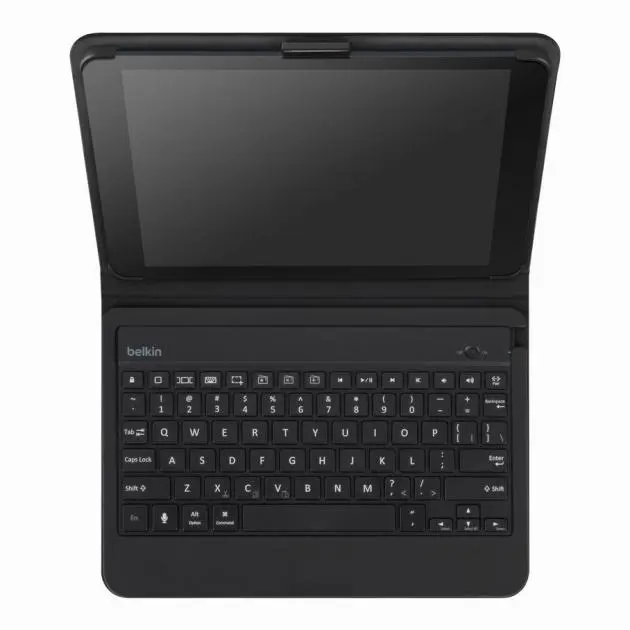
THE “ULTIMATE” enhancement to your iPad Air 2, the Qode Ultimate Pro Keyboard Case, lets you easily turn your iPad into a notebook computer simply by using a Bluetooth connection.
The protection case can be conveniently detached from the keyboard when you want to use your iPad Air 2 as a tablet or you can fold the keyboard flat behind the iPad to use it in handheld mode and the Bluetooth keyboard will automatically turn off.
The case is made of high-quality material that protects the back of your iPad Air 2 while the keyboard chassis is made of aircraft-grade aluminium alloy. When the case is closed, the keyboard offers added protection to the front of the tablet.
The case perfectly fits an iPad Air 2 while allowing access to all the tablet’s ports and controls. Rubber feet prevent the keyboard from touching the screen and the keyboard itself is so smart that there’s no need for a power button. Switching on and off is controlled by smart-sensing technology, with the keyboard turning itself on by sensing the weight of your iPad Air 2. When you’re using the keyboard by itself, the fabric hinge lets it know when to turn on and off.
Combined with the Bluetooth Smart technology means the keyboard uses very little battery power so the keyboard’s battery should to last up to a year. It’s recharged through a microUSB port and the charge cable is provided with the package.
Belkin says it uses SoundFlow design to direct the sounds of your iPad towards you so the case won’t block you from enjoying music on the tablet.
The Qode Ultimate Pro Keyboard case is designed to have the same number of keys as a laptop computer keyboard and features backlit keys with three brightness levels making it easy to type even when the lights are low.
Not only does the keyboard wirelessly pair to your iPad Air 2, but you can use it by itself and pair it with other devices. Better still, you can pair up to two devices at once, allowing you to type emails and text messages on your connected smartphone and then switch to use the keyboard on the iPad.
The keyboard case lets you use the iPad in landscape or portrait mode by providing two magnetic viewing angles to support the iPad. The magnets in the case match up with the magnetic fabric hinge for a secure hold in any position.
During the test, I had no problems connecting the Bluetooth keyboard to the iPad Air 2 easily and I didn’t lose the connection at any time.
Typing on the keyboard gave me the same feeling as working on a laptop computer though I didn’t find the case conducive to using the tablet to read or to watch movies with the keyboard attached. Even better, I was able to type with the keyboard on my lap thanks to the dual neodymium magnets keeping the iPad Air at the right angle.
The keys were well spaced and responsive thanks to Belkin’s award-winning TruType keys, which provide a smooth, laptop-like typing experience.
Each key has a surface area of 181mm x 205mm, more than competing keyboards on the market. There is 3mm of space between each key and 1.5mm of travel.
Students or professionals who type a lot on the go and who don’t want to carry a heavier laptop computer will definitely find this Bluetooth keyboard case very useful.
Qode Ultimate Pro Keyboard Case for iPad Air 2 retails for Bt5,790.
Key Specs
- Weight: 490 grams
- Keyboard layout: Same |number of keys as a laptop
- Keys: Backlit, with three brightness levels available
- Modes: Landscape/Portrait
- Keyboard viewing angles: Two
- Number of paired devices: Two
- Battery life: Up to 1 year |continuous
- Compatibility: iPad Air 2
- Warranty: 1-Year Limited
- Package includes:, Keyboard, USB to Micro-USB charging cable, Quick Installation Guide
