
Take Note of the changes


Play
Samsung's Galaxy Note II is a vast improvement on its predecessor in multiple ways
Samsung Galaxy Note II could be a perfect choice as a smart phone with its large and gorgeous screen or a highly portable tablet computer that can be carried in your shirt pocket.
And compared to the original Note, Note II, Samsung’s new flagship smart phone, has a lot of improvements and features.
Among other things, Note II has a larger, more colourful and brighter screen and a much faster processor, as well as larger capacity battery and a better stylus.
Note II uses a 5.5-inch 16:9 HD Super AMOLED screen, compared to 5.3-inch of the original Note. It sports a 1.6 GHZ quad-core processor, compared to 1.4 GHz dual-core CPU of the original Note, resulting in much better performance.
And Note II uses 3,100 mAh battery, compared to 2,500 mAh battery of the first note. It’s 24 per cent larger and helped me survive more than a day per charge, even though I used of a lot multimedia functions during the test.
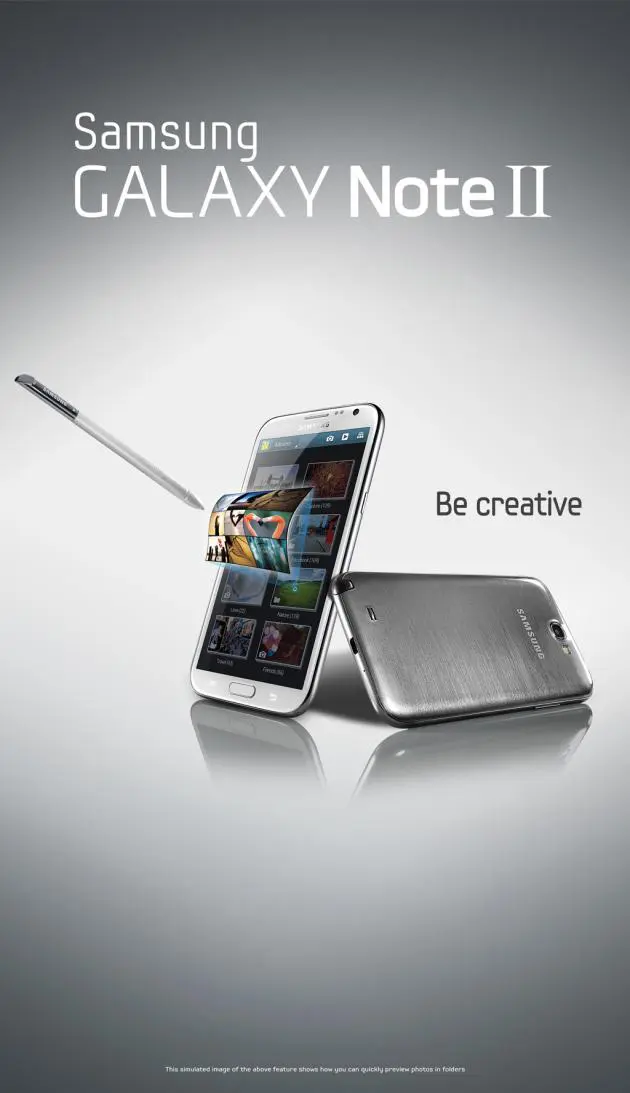
Note II looks really gorgeous with round corners, glossy surfaces and an outstandingly sharp, bright and colourful screen.
It is available in marble white and titanium grey. I got to test the white one and really loved its look.
The handset provides a large physical home button below the screen for easy navigating back to the home screen. There are also touch-sensitive buttons for bringing up the particular menu of the current screen and for going back.
Note II uses a new S Pen stylus that comes with new tricks. The pen is longer, thicker and ergonomically designed for easy grip, providing more precise and comfortable writing experience. The most outstanding new feature is Air View, which allows you to hover the S Pen over an email, S Planner app, image gallery or video to preview content without having to open it.
The S Pen also comes with an Easy Clip function that allows you to outline and crop any content on the screen in any shape. You simply press the button on the stylus and the Note II will realise that you want to clip or edit the selected content on the screen.
There is also Popup Note function that lets you open an S Note instantly as a pop-up window anywhere on the screen. For example, when you pull out the S Pen during a phone call, the S Note application will automatically pop up on the screen. Then, you can write a quick message.
You can also use the S Pen with the Photo Notes application to write on the back of a photo and share it with others in JPEG format.
The S Pen also comes with the Quick Command function, which lets you quickly activate frequently used applications. You simply swipe the screen upward using the S Pen with its button pressed and the Quick Command pad will appear. But you need to first register a pen gesture for each command. For example, you may draw “@” for launching an email application.
A new application for having fun with the S Pen on Note II is Paper Artist. You can take a photo with this application and the photo will look like an illustration with fun effects and frames. You can use the S Pen to write or draw on the illustration and the Note II’s S Pen is capable of up to 1,024 levels of pressure sensitivity so you can really be artistic with it.
Note II also supports multi-tasking, allowing you to launch multiple windows on one screen without having to close previous applications. Multiple windows are stacked on the screen and let you easily switch among applications, making the use very conveniently. Its 2-GB RAM allows the multi-tasking windows to work smoothly.
There is also a feature called Popup Video. While watching a video, with the touch of a button, the video will become a floating window on the display. The video will continue to play and it can be repositioned to any part of the GALAXY Note II’s screen.
Another good and useful function of Note II is Smart Stay, which was first introduced on the GALAXY S III. The Smart Stay uses the camera in the GALAXY Note II to prevent your handset from going into standby mode while it detects a user in front of the device.
The GALAXY Note II comes with an 8 Megapixel rear-facing and 1.9 megapixel front-facing camera with HD video recording. During the test the camera took good quality photos in well-lit environment.
The camera has very useful features like Buddy Photo Share, Burst Shot and Best Photo, which were introduced on the GALAXY S III earlier.
In the Buddy Photo Share function, Note II can be set recognise a person’s face so that the photo will be emailed to that person.
The most fun and unique feature for Galaxy Note II is called Best Faces. This function is like cheating. It takes multiple group shots at the same time and combines them to create the best possible image. When you take a group photo with this function a Gallery will open to allow you to tap the yellow frame on each face, and choose the best individual pose for the subject. After choosing a pose for each individual, you can tap the Save button to merge the images into a single photo, and save it.
Galaxy Note II runs on Google Android 4.1, Jelly-Bean, operating system. I tested it on TrueMove H’s HSPA+ 3G network. The phone performed very fast and smooth. The menus were responsive and video files and music files were played smoothly.
I managed to check emails, update my Facebook status, upload photos to my Facebook wall, update my Foursquare locations very fast during the test. Applications were also downloaded and installed very fast. Its Internet browser also fetched and displayed information fast.
Samsung Galaxy Note II retails for Bt22,900.
Key specs:
_ OS: Android 4.1, Jelly Bean
_ Networks: GSM/HSPA-Plus 850/900/1800/1900 MHz
_ CPU: 1.6 GHz quad-core Exynos 4412 processor
_ Camera: 8MP CMOS main camera, 1.9 MP CMOS front camera, 1080p@30 fps video recording
_ Display: 5.55-inch HD Super AMOLED with 1,280 x 720 pixel resolution
_ Sensors: Accelerometer, Geo-magnetic, Gyro-sensor, Light Sensor, Proximity Sensor, Barometer
_ Connectivity: Wi-Fi a/b/g/n, Wi-Fi Direct, Bluetooth 4.0, NFC, MHL, All-Share, KIES Air, USB 2.0
_ Memory: 2 GB RAM
_ Storage: 16 GB on board, expandable with microSD up to 64 GB
_ Battery: 3100 mAh
_ Dimension: 80.5 x 151.1 x 9.4mm
_ Weight: 182.5g
