
A phone for all seasons


Play
The Samsung S4 is ideal for those who want a smart phone to work for them
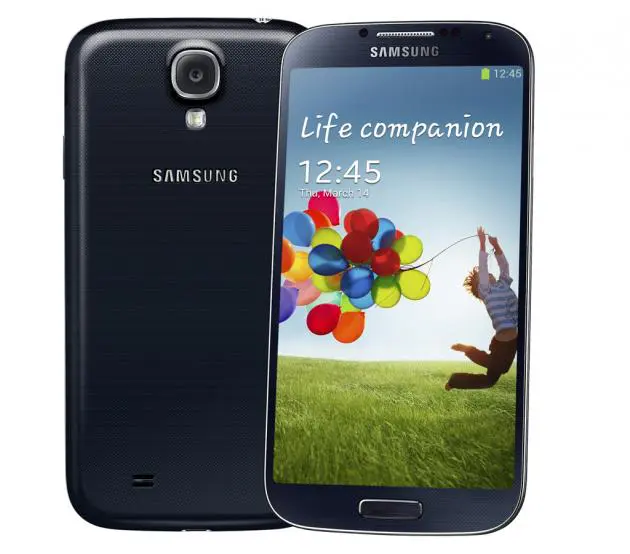
A big-screen smart phone that can apparently do everything bar the washing up, the Samsung S4, the latest in the Korean manufacturer’s flagship Galaxy series, comes with a sleeker look, smarter functions, faster performance and improved user-interface.
The S4 is powered by an eight-core processor – four cores running at 1.6 GHz and four others at 1.2 GHZ, compared to the S3 which boasted a 1.4 GHz quad-core processor.
The 5-inch Super AMOLED display with 1080 x 1920 resolution and a pixel density of 441 is even easier to read than its predecessor’s 4.8-inch Super AMOLED panel. But even though the screen is a little larger, the S4 features a smaller profile and loses 3 grams in weight.
The S4’s display is protected by Corning Gorilla Glass 3, an upgrade from S3’s Corning Gorilla Glass version 2 protection.
The S4 also has a much better camera with a 13 megapixel rear camera and 2 MP front camera, compared to S3’s 8 MP and 1.9 rear and front cameras respectively.
It runs on Android 4.2.2 Jelly Bean operating system with the TouchWiz Nature UX 2.0 user-interface on top sporting a lot of new widgets.
The gorgeous Full HD display should turn others green with envy. At full brightness, the Super AMOLED display with 1080 x 1920 pixel is bright and sharp and the colours are vibrant, making photos and video viewing very pleasing. Emails, web pages and e-books also look crisp.
Thanks to its octa-core processor and 2 GB of RAM, the S4 has a very smooth performance. It comes with 16 GB of internal storage, expandable with a microSD card up to 64 GB.
It supports HSPA+ 42 Mbps 3G connection at 850/900/1900/2100 MHz. The data connection was tested on Wi-Fi connection. Apart from the fast Wi-Fi 802.11n format, the S4 also supports the new and super fast 802.11ac format.
The test found that the S4’s menus and touch screen along with screen scrolling were very responsive. The handset played HD videos and YouTube clips smoothly. Web pages with graphics and photos were rendered fast and graphics games like Sonic 4 were also fast.
Samsung has integrated the front camera as part of its smart user interface, meaning it can be used in several functions including Smart Stay, Smart Scrolling and Smart Pause.
In the Smart Stay mode, which was also featured on the S3, the front camera is used to detect whether your eyes are still reading the content on the screen. Continue looking at the screen and the Smart Stay will prevent it from turning off.
Samsung has gone a step further and introduced Smart Scrolling, allowing your eyes to scroll up or down the page or email you are reading. The front camera will detect the angle of your face and eyes to see if you looking down or up and scroll the screen until your eyes look level with it. It can be disconcerting, especially for people like myself who are used to scrolling with their index finger.
The Smart Pause function uses the front camera to detect your eyes and pauses a video when you look away from the screen. It will resume the playback when you look at the screen again.
The S4 also has Proximity/Gesture sensor located on the top near the front camera for using with its fun Air Gesture functions. The Air Gesture has five functions – Quick glance, Air jump, Air browse, Air move and Air call-accept.
The Quick glance allows you to view notifications, missed calls, new messages, time and date without having to touch your S4 at all – you simply move your hand above the Proximity/Gesture sensor when the screen is off.
The Air jump function is fun. While viewing emails or web pages, you can move your hand up or down across the sensor to scroll the page up or down.
The Air browse allows you to browse images, web pages, songs or memos by moving your hand to the left or right across the sensor.
Air move is used for moving an icon or an event on a daily or weekly calendar. You can tap and hold an icon with one hand and then move the other hand to the left or right across the sensor to move to the screen you want to place the icon. You apply the same technique to the daily or weekly calendar, moving to the calendar page you want to move the event to.
Air call-accept allows you to accept a call by moving your hand to the left and then to the right across the sensor. It can also start the speakerphone mode automatically.
Another fun user-interface is the Air View function, which allows you to point to an item with your finger without touching screen to preview the content or view information in a pop-up window. But it does not apply to all apps. It can be used with S Planner, Gallery and Messaging as well as web pages. For example, when you point your finger at a message, a pop-up window will show the top part of the content or when you point at an area on a web page for a few seconds, the area will be magnified.
The S4’s 13 MP main camera is great for those who love taking snapshots for instant sharing. Samsung’s website does not provide in-depth information about the camera’s spec, but according to connect.dpreview.com, S4’s uses a 13MP CMOS sensor. And data information embedded in image files shows that the S4’s camera has f/2.2 lens with 31mm focal length (in 35mm equivalence) in 4:3 aspect ratio, which is very good spec.
The camera captures pleasing quality photos in most lighting conditions. The results are sharp and clean. It also has Beauty face mode for making your subject look younger with fair and smooth skin.
S4 provides 11 shooting modes and several merit special mention. One of these is the Dual Shot mode, which takes two shots at the same time using the front and the main camera. The front camera is used to capture your face to insert on the main picture captured by the main camera. You can select from several frame types, and the frame size can also be adjusted.
In the Drama mode, you can capture actions of your subject and show all the moves in one picture. The camera will take a series of photos and combine them to create an image that shows trails of the movement. You need to hold the camera still and should not take photos of a subject with a similar colour to the background. In this mode the camera fires up to 100 shots within four seconds.
In the Sound & Shot mode, the camera will record up to 9 seconds of sound while you take the shot but this shot has to be viewed on S4 to be able to hear the recorded sound.
The Eraser mode is also very useful. It will take five consecutive photos and remove moving objects from the photo, which is saved for you.
Another handy feature is that S4 comes with an infrared port and an app that can turn the phone into a universal remote control.
Samsung Galaxy S4 is available in Black Mist and White Frost for Bt21,900.
Key specs
_ Network: HSPA+ 42 Mbps 850/900/1900/2100 MHz
_ Processor: Exynos5 1.6 GHz quad-core + 1.2 GHz quad-core processor n Display: 5-inch Full HD Super AMOLED (1920?1080) display
_ OS: Android 4.2.2 (Jelly Bean)
_ Memory: 2 GB LPDDR3 RAM
_ Storage: 16 GB User memory + microSD (up to 64GB)
_ Camera: Main (Rear): 13 Megapixel, Front: 2 Megapixel, Full HD recording @ 30fps
_ Connectivity: WiFi a/b/g/n/ac (HT60), GPS/GLONASS, NFC, Bluetooth 4.0, IR LED (Remote Control), MHL 2.0
_ Sensor: Accelerometer, RGB light, Digital compass, Proximity, Gyro, Barometer, IR Gesture, Temperature & Humidity
_ Battery: 2,600 mAh
_ Dimension: 136.6 x 69.8 x 7.9 mm
_ Weight: 130 g
