
Music with a mood


Play
LG's newest dual docking system adds atmosphere to your favourite tunes
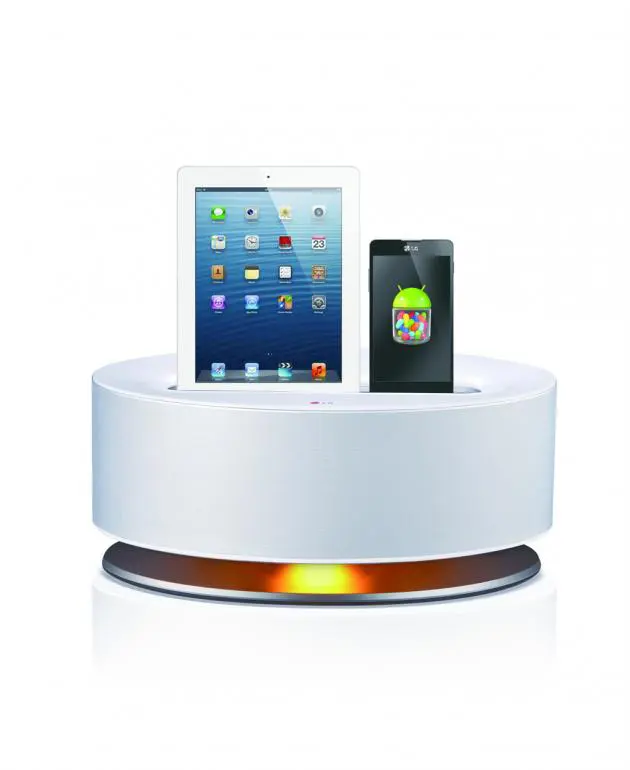
A dual docking station in a compact body but with an impressively powerful sound system, the LG ND8530 lets you enjoy your favourite music in style.
Larger than the ND2530 reviewed earlier on this stage, the ND8530 comes on a stand allowing its lighting unit to beam down, adding mood to the listening experience.
The ND8530 has a metallic white cylinder design that’s similar to the ND2530 with vital statistics of 450 x 200 x 227 mm that allow it to sit on a side table or a shelf below the TV. And while it’s small, it boasts 40 watts x 2 channel power.
The sound filled my large living room with the music power during the test.
The lightning dock connects to the iPhone 5 and new iPad and the micro-USB dock connects to an Android smart phone’s micro-USB port.
You can plug both iPhone 5 and an Android smart phone at the same time to recharge one and enjoy music from the other.
To use an Android smart phone with the docking station, your phone needs to run on at least the Android 4.1 operating system. And since there are several models and brands of Android smart phones with different orientations of the micro-USB port, ND8530 allows you to rotate its Android device dock. All you need to pull the dock upward and then rotate it to the right or to the left. The package even comes with tweezers designed for this purpose.
I connected my LG Optimus G Pro using the micro USB dock and was able to play music stored on the phone without any problem. After I connected the phone to the dock and pressed the play button on the remote control, the phone started playing the first song of the latest album from the phone’s Music Player app and streamed it to the ND8530.
LG says the ND8530 might not be compatible with an Android smart phone that does not support the AOA (Android Open Accessory) 2.0. It is possible that certain devices that do not support AOA 2.0 USB audio standard may freeze or reboot when connected to the ND8530. You are also recommended to remove the case of your smart phone before connecting it to the docking system.
A 3.5mm stereo jack behind the unit can be connected to an MP3 player or other portable devices with a 3.5mm stereo out jack.
Next to it is a full-size USB port. If you have an iPhone 4 or an iPod that does not have a Lightning port, you can still use your USB cable to connect your device to this full-size USB port.
With the USB port, ND8530 supports iPod touch 3G, 4G, 5G, iPod nano 4G, 5G, 6G, 7G, iPhone 3GS, 4 and 4S as well as all iPad models.
I tested it with the first iPad and it worked fine. I had no problem streaming music from the iPad to the docking station. When the iPad was connected to the ND8530, the volume was taken over by the docking station.
Press the button at the back of the unit to turn on the orange light and add mood to your music. Press the button again to reduce the brightness to the middle level and yet again to turn it off.
You can also use the ND8530 as powerful sound system for your LG TV provided it has LG Sound Sync wireless technology. Press the Sound Sync button at the back of the unit and then activate the Sound Sync function of your TV.
A Bluetooth connection is another highlight of the ND8530 and as it’s so convenient, it’s worth using it to stream music from your smart phone to the docking sound system.
The ND8530 also makes it very convenient to make a Bluetooth pairing between your smart phone and the docking station by providing a NFC (Near Field Communication) tag on the top of the unit.
Simply activate your phone’s NFC function and tap it gently at the tag. Then, your smart phone will download the LG Bluetooth Remote app from Google Play Store and install it. The app will turn on the Bluetooth function of your phone and connect to the ND8530. Downloading has to be done only for the first use. After that you can use the LG Bluetooth Remote app to stream music to the ND8530 as well as control its functions, such as increasing or decreasing volume. You can also use the app to turn off the docking station though to turn it on, you will need the ND8530’s real remote.
Or you can use Bluetooth function of your phone to scan for and connect to the ND8530 and play music from your music app.
I found the ND8530 sound reproduction impressive.
It has two speakers built into the unit and a bass port underneath. The unit reproduced deep and solid bass sounds, especially when its Bass Blast equalizer mode was activated. And it reproduced good details and clarity of music as well. It uses a dynamic loudness algorithm to balance, bass-range, middle-range and the tweeter range to boost music quality.
For songs with very powerful bass tune, you’ll need to turn off the Bass Blast mode to avoid distortion.
LG ND8530 retails for Bt9,990.
Key specs:
_ Amplifier’s output power: 40 watts x 2 ch (4 ohms at 1 kHz)
_ Total Harmonic Distortion: 15 per cent
_ Speakers: built-in with 4-ohm impedance, 40 watts to 80 watts power handling
_ Docks: Lightning, micro-USB ports
_ Input: 3.5mm stereo jack
_ Power consumption: 48 watts
_ Dimensions (W x H x D): 450 x 2000 x 227 mm
_ Weight (Approx): 5.8 kgs
