
A sweet tooth for Bluetooth


Play
Acer's Iconia W3 tablet comes with a snap-on keyboard, ready to work wherever you go
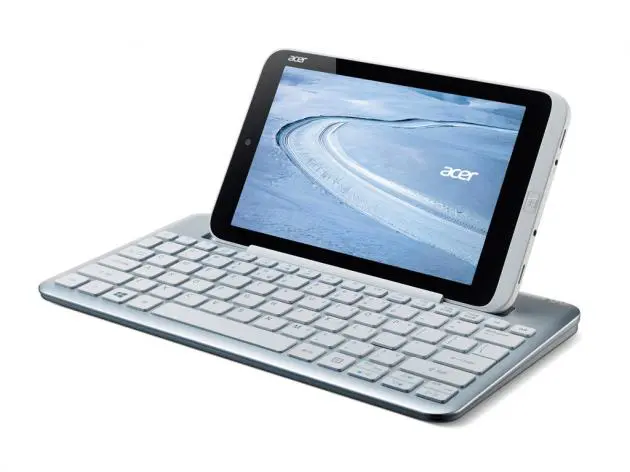
Acer Iconia W3 can be both your tablet computer for entertainment and a netbook computer for work on the go with its accompanying Bluetooth keyboard.
As a tablet computer, W3 features an 8.1-inch multi-touch LCD display with 1280x800 pixel resolution. And it has a good performance for a tablet as it is powered by an Intel Processor Z2760 dual core running at 1.8 GHz and it is equipped with 2 gigabytes of RAM or active memory for preventing crash or slowdown. It has 32 GB of storage, which could be expanded with a microSD card of up to 32 GB. The tablet runs on the Windows 8 32-bit operating system.
With the Bluetooth keyboard, the W3 becomes a netbook computer and to allow you to work on the go. Acer provides Microsoft Office Home & Student 2013 with the tablet. The Office package lets you work on Word, Excel and PowerPoint documents on the go.
The keyboard is designed to allow you to snap and keep W3 at its back. You attach the tablet to the keyboard with the screen facing down and the tablet will be locked into one piece, which is easy to carry. There is a button to release the tablet from the keyboard. The table weighs 492 grams and the keyboard adds 401 grams. The Bluetooth keyboard is powered by two AAA batteries.
The keyboard has a cradle above the keys for you to place the tablet. The keyboard is a full-size keyboard so it is larger than the tablet and it has both Thai and English-language labels to support typing in both languages.
It is not difficult to connect to the keyboard. For the first use, you need to add a device to the Windows 8 system and the OS will find the Bluetooth keyboard. When you select it, Windows 8 will prompt you to type a code to pair the tablet and the Bluetooth keyboard. You need to do this only once. Since it is a full-size keyboard, it is easy to type on. I used it to type a Word document comfortably during the test.
The W3 has no 3G connection. It connects to Internet with a Wi-Fi connection.
It has good performance for a tablet. Its multi-touch screen was responsive and the screen scrolling was fast and smooth. Music files and video files played smoothly. And the Microsoft Office applications ran smoothly. It played good music quality as well when tested with my premium in-ear Sony headphones.
It is very good that W3 package comes with a micro-USB to full-size USB adapter so that you can plug in your USB drive to the tablet for accessing your files, such Office documents, music files and video clips.
Measured with internal benchmarking tool of Windows 8, the W3 scored good points for a table computer. On the scale of 1.0 to 9.9, it got 3.4 points for the processor performance of calculations per second. It scored 4.6 points for the performance of memory operations per second.
It scored 3.5 and 3.2 points for the desktop graphics performance and 3D business and gaming performance respectively. For the performance of disk data transfer rate, it got 5.8 points.
The tablet has a good battery life or about eight hours for general use.
Acer Iconia W3 has a suggested retail price of Bt12,900, which includes the price of the Bluetooth keyboard.
Key specs
_ OS: Windows 8 32-bit
_ Processor: Intel Atom Z2760 dual core 1.8 GHz
_ Display: 8.1-inch WXGA multi-touch LCD with 1280x800 pixels
_ Graphics adapter: Intel UMA
_ Memory: 2 GB RAM
_ Storage: 32 GB eMMC, expandable with microSD up to 32GB
_ Optical drive: None
_ Connectivity: Wi-Fi 802.11 b/g/n, Bluetooth
_ Webcam: Acer Crystal Eye Full HD webcam
_ Battery: 2-cell 3500 mAh Li-Polymer battery
_ Dimension: 218.9 x 134.8 x 11.43 (H x W x D)
_ Weight: 492 g
