
Working in the clouds


Play
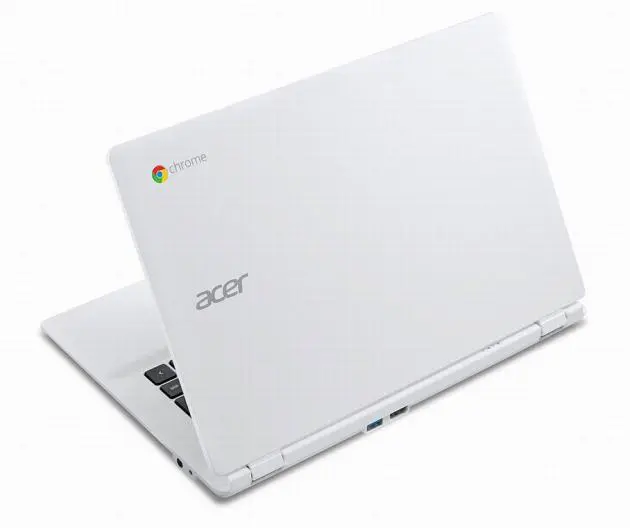
With enough battery life to last all day long on a single charge and more cloud storage than you could possibly need, the Acer Chromebook 13 is perfect for going walkabout
AN AFFORDABLE notebook computer that lets you start working without buying programs and apps, the Acer Chromebook 13 uses Google Chrome as its operating system and comes complete with free apps that allow you to work on business documents, edit photos, watch videos and play music files.
The only drawback is that you need to stay online with a Wi-Fi connection because the Chromebook saves all your work to the free 15 gigabytes of cloud space on Google Drive. You do of course require a Google account but on the positive side, you also receive an extra 200 GB of cloud space free for two years.
Since the Chromebook requires you to work online, it comes with just 16 GB of flash drive space and that’s mainly for storing the apps. It does have two USB 3.0 ports, though, so if you need more offline storage, you can use a USB hard drive.
To make most of the Chromebook, you should have a Wi-Fi router with the latest wireless protocol of 802.11ac, which is what the notebook computer is using. That said, I tested it with my 802.11n router and it worked more than fast enough for my needs.
The Chromebook 13 has good performance for an online device. It’s powered by NVIDIA Tegra K1 mobile processor, which is a Quad-Core ARM Cortex-A15 processor with a max speed of 2.3 GHz. The built-in 192 supercomputer-class GPU cores enable the processor to play Full HD video and computer games.
The Chromebook 13 has 4 GB DDR3 memory, which uses low |voltage power to save the battery. The “13” code in its name refers to the 13.3-inch HD Acer Comfyview LCD display with 1,366 x 768-pixel resolution. It also has the Acer Crystal Eye HD webcam for making video calls.
The Chromebook is just 17.95 mm thick and weighs only 1.49 kgs. Its four-cell battery has an estimated usage time of 13 hours – that’s because the processor and the memory as well as the flash storage consume less power than conventional notebooks.
The Chromebook took about 10 seconds to start up to the screen when I logged on to my Google account. It closed off the screen immediately when I ordered it to shut down and took three more seconds to completely turn off the power.
To start using the Chromebook, you must add your Google account as a user.
Once logged on, look for the launcher at the bottom left corner of the screen. This displays buttons for launching the Chrome browser, the Gmail page, the Google search page, the online Google Docs |service, the YouTube service and the Help function.
If you want to use other apps, you can click on the magnifier icon on the launcher, and it will display a screen with access to Google search, Google Docs, Gmail, Help and All apps.
When you click on the All apps icon, you will find two more screens of available apps, including Google Calendar, Google Sheets, Calculator, Google Slides, Google Forms, Google Drawing, and Hangouts call.
During the test, I worked on Google Docs with no problem. The Chromebook synced my writing with the online storage fast and smoothly. If you want to work on spreadsheets and presentations, you can use Google Sheets and Google Slides respectively.
However, I discovered the Google Play Music didn’t function in Thailand so I had to download a free music player app from the Chrome Web Store.
The Chromebook displays its status tray on the bottom right corner of the screen. This gives such useful information as the current state of your network, battery and more. When you have a question about the device, you can get help by clicking the “?” in the status tray.
You can shut down or log out by clicking on the status try to bring up its screen.
To customise the appearance of the Chromebook, click on the setting option in status play.
Acer Chromebook 13 has a |suggested retail price of Bt14,900, VAT included.
Key Specs
- OS: Google Chrome Operating System
- Processor: NVIDIA, Tegra, |K1 mobile processor
- LCD: 13.3-inch (1,366x768)HD Acer ComfyViewtm LCD, 1920x1080 Full HD
- Memory: 4GB DDR3 Low Voltage Memory
- Storage: eMMC 16 GB
- Wireless connectivity: Wi-Fi 802.11ac + BT
- Webcam: Acer Crystal Eye HD
- Battery: 4-cell Li-Prismatic battery / 13-hour battery
- Dimensions: 17.95 x 327 x 227.5 mm (H x W x D)
- Weight: 1.49 kg.
