
Linking up with Linksys


Play
Cisco's new Wi-Fi Router makes fast streaming a dream
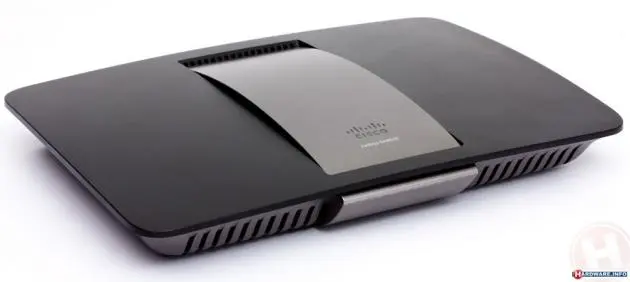
The Linksys Smart Wi-Fi Router AC 1750 HD Video EA6500 is the latest in Cisco’s Linksys Smart Wi-Fi router family. It’s impressively fast thanks to 802.11ac technology and excellent for both video and multimedia files.
IEEE 802.11ac is the next-generation wireless technology and delivers powerful performance with Wi-Fi speeds of up to 450+1300 Mbps. It can reach speeds approximately three times faster than existing 802.11n products, whose maximum speed is 450 Mbps. The technology also offers better range and reliability and helps to improve the power consumption of mobile devices.
Like earlier Linksys router models, the EA6500 uses the Linksys Smart Wi-Fi platform that allows users to easily take control their home network and devices through Smart Wi-Fi Tools and Apps, even when they are on the road.
The EA6500 recently won the iF product design award 2013, an international recognised label for outstanding achievements in design, and it’s easy to see why – this is a very attractive router and will look good anywhere in the home.
The EA6500 has two USB ports. One port can be connected with a USB driver to function as a network printer while the other port is to connect to a USB hard drive to serve as network storage. It also has built-in media server and FTP server protocols that can be set with only a few mouse clicks.
The EA6500 also has four gigabit Ethernet ports that support up to 1,000 Mbps connection.
Another nice new feature is the SimpleTap card, which supports Near Field Communication (NFC) technology. Simply tap the card to your NFC-enabled smart phone and it will be linked to your EA6500 router, meaning you don’t need to key in the wireless password.
To use EA6500, you will need an ADSL modem or an ADSL modem/router. You must connect an Ethernet port from the modem or modem/router to the EA6500 port to receive the Internet signal.
Setting up the EA6500 was a breeze. It comes with an installation CD that guides you step by step to set up your Internet account on the router and set your wireless setting. You can also opt to manually set up the router through a few simple steps.
I tested the EA6500 with my TP Link TD-W8920G. I disabled the router function of the W8920G and connected the EA6500 to it without any problem. I manually set up the EA6500 by connecting to the router wirelessly and input my Internet username and password to change the SSID or router’s wireless name to my own router’s wireless name. When I set the same wireless password I used with my own router to the EA6500, my wireless network came back to life with all my existing devices coming online without the need to change any settings.
To make most of the EA6500’s speed or 802.11ac technology, you will also need a wireless adapter that also uses the 802.11ac wireless protocol. I tested the router’s speed with Linksys WUMC710 Wireless-AC Universal Media Connector, which uses the 802.11ac technology as well.
I connected the media connector to my notebook computer and tested downloading a video file from a USB hard drive that is connected to the EA6500. It took about only 57 seconds to download a 377 megabyte video file at an average speed of 800 Mbps.
I also streamed a Full HD movie from the hard drive to be played on my notebook linked with a media connector and the movie played smoothly.
The EA6500 has good wireless coverage too. I placed it on the living room table and tried connecting my smart phone from the rooftop - equivalent to the third floor - and found that my smart phone was connected at three of four wireless scales.
The EA6500 also supports the cloud-based. Linksys Smart Wi-Fi technology. You can register for a cloud account with Cisco and link your EA6500 to the account.
Then, you can connect to the router via Internet connection or an Android smart phone app to monitor devices online on your network.
You can set parent |control level and prioritise media use or set access guest to your router’s Intent usage, among other things.
The Linksys Smart Wi-Fi Router AC 1750 HD Video Pro retails for Bt7,890.
Key specs
- Switch Port Speed: 10/100/1000 Mbps (Gigabit Ethernet)
- Radio Frequency: 2.4 and 5 GHz
- Number of Antennas: 6 (3 per band)
- Ports: Power, USB (2), Internet, Ethernet (1-4)
- Buttons: Reset, Wi-Fi Protected Setup
- Security Features: WEP, WPA, WPA2, RADIUS
- Security Key Bits: Up to 128-bit encryption
- Storage File System Support: FAT, NTFS, and HFS+
- Dimensions: 256 x 40 x 184 mm
- Weight: 501 g
- Power: 12V, 3A
