
Back to the big screen


Play
A break for the eyes: Intel's tiny Compute Stick lets you check email, surf the web and work on cloud documents on your giant TV
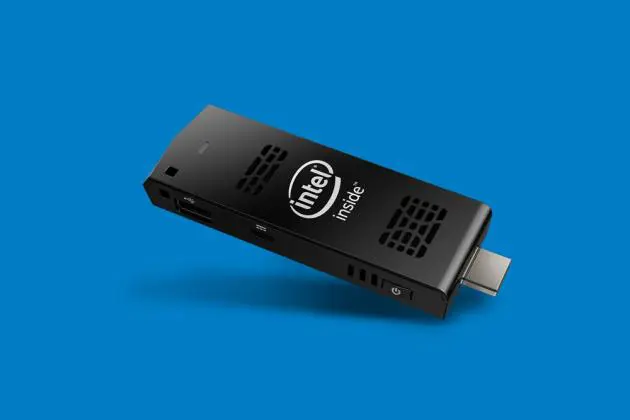
WITH THE coolly designed Compute Stick from Intel, you have a computer that fits in a shirt pocket and yet can make ingenious use of your large-screen TV.
It looks like a flash drive, if somewhat larger, but – at 103.4x37.6x12.5mm and 54 grams – it’s obviously nowhere near as big as a conventional computer.
The Compute Stick’s HDMI port points outward to fit the HDMI-in port of your TV. It comes with a power adapter that hooks into the micro-USB port, and suddenly your TV is a large-screen computer. Your ageing eyes will thank you for the enormous view of Web pages, email and cloud-based documents, as well as Full HD clips on YouTube.
For its diminutive size, the Stick is quite powerful for most basic computing tasks. That’s thanks to its Intel Atom Z3735F quad-core processor running at 1.33GHz with two megabytes of buffering memory. It has two gigabytes of DDR3-1333MHz working memory (RAM).
The Stick uses Samsung 32 GB eMMC Flash storage and, for rendering the lovely display, Intel HD Graphics. The sound comes courtesy of Intel HD Audio via HDMI, supporting multi-channel digital audio. The audio chip streams the sound to the TV via the same HDMI port, which is convenient.
The Compute Stick runs on Windows 8.1 with a Bing 32-bit operating system. Intel says you’ll be able to upgrade it to Windows 10 once that platform is released.
Minimal design saves power and keeps the price attractive. There’s just the one USB 2.0 port and a microSD card slot for expanded memory, but you’ve also got a built-in 802.11 b/g/n Wi-Fi adapter and a Bluetooth 4.0 adapter.
You plug the USB wireless receiver of your wireless keyboard and mouse into the USB port to work on the Stick computer, so you need a combination wireless keyboard-and-mouse set that requires just the one USB receiver.
I tested the Stick with a Logitech mk220 combo set and the keyboard and mouse worked fine.
The microSD card slot supports micro SDXC version 3.0 with UHS I. As well as increasing storage, you can copy pictures and videos onto a microSD card to play on the TV through the Stick.
I found that the Stick performs quite well. Upgraded Windows 8.1 files were displayed with sharp text and properly fit my Samsung Plasma TV’s 1920x1080-pixel resolution.
I could work on documents stored in my Microsoft OneDrive cloud storage and on Google Drive without problem, and I could also conveniently stream music files from shared folders on my desktop and notebook computers. Monitoring Facebook feeds on the TV’s big screen is pretty cool, too, as is watching Full HD movie trailers on YouTube.
Impressively, the Compute Stick played 1080p Full HD movies in MKV format smoothly and sharply, using the “VLC Player for Windows” app. Movies from IPTV websites such as Doonung.com also played without a hitch.
Another treat is reading the news and viewing photos on TV |via the Bing News app. The font is large and clear and the pictures colourful.
The Intel Compute Stick has a suggested retail price of Bt5,990.
Key Specs
- OS: Windows 8.1 with |Bing 32-bit
- CPU: Intel Atom Processor Z3735F quad-core 1.33GHz
- Memory: 2GB DDR3 1333MHz RAM
- Storage: 32GB eMMC Flash storage
- Graphics: Intel HD Graphics HDMI 1.4a
- Audio: Intel HD Audio via HDMI
- Peripheral connectivity: Integrated 802.11 b/g/n, USB 2.0, Bluetooth 4.0, microSD card slot
- Power: 5V 2A wall-mount AC-DC adapter
- Chassis size: 103.4x37.6x12.5mm
- Weight: 54 grams
