
Twice as nice


Play
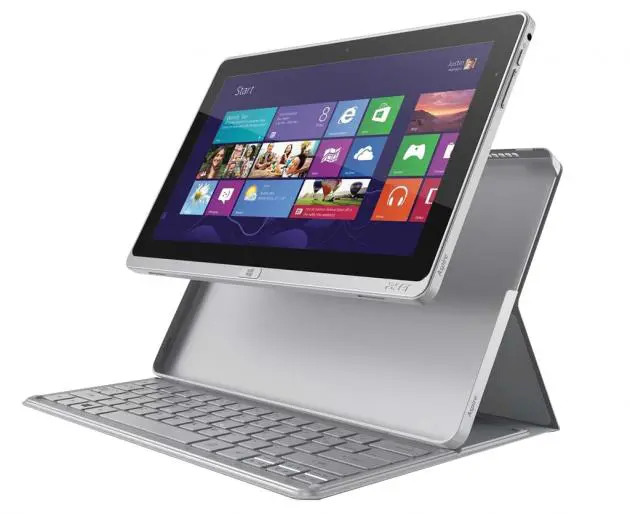
The new Acer Aspire P3 allows you to move between ultrabook and tablet at the flick of the wrist
A sleek tablet computer that doubles as a notebook and switches easily between the two, the Acer Aspire P3 Hybrid Ultrabook comes complete with Bluetooth keyboard and a keyboard case.
To use it as a tablet, simply detach it from the keyboard case, which also serves as protective cover or fold the screen over the keyboard, whichever your prefer.
To use P3 as an ultrabook, snap the tablet into the protective case and use the power button on the top part of the keyboard desk to turn the unit. Then, you can slide the screen, which is actually the table, into the groove. The screen will be in an upright position and you will be ready to type and work on the ultrabook.
Put the screen face down and the computer automatically goes into sleep mode and just lift it up to have it spring back to life.
The tablet looks sleek in a brushed silver aluminium chassis, which measures 190.77 x 295.4 x 9.95/10.15 mm and weighs in at just 790 grammes. Even with the keyboard and protective case, the P3 is not much thicker and remains easily portable. The keyboard case adds 19.8-mm thickness and the overall weight is increased by 598.74 grammes.
The P3 is powered by Intel Core i5-3339Y running at 1.5 GHz, so it is quite powerful for an ultrabook and a tablet. It has 4 GB DDR3 memory and is equipped with 120 GB SSD (solid state drive) storage, which is very large for a tablet though only average for an ultrabook. P3 runs on Windows 8 64-bit edition.
It uses 11.6-inch multi-touch HD LCD with 1,366 x 768 pixel resolution. The screen uses IPS (In-plane switching) technology to ensure a good viewing angle.
You can use it as a Full HD movie player for your large-screen LCD or Plasma TV by connecting P3’s micro-HDMI port to your TV.
That port is next to the full-size USB 3.0 port on the left side of the tablet. A microphone, rest button, and the power jack are also located on the left.
You’ll find the headphone/speaker jack, the power button, a battery status indicator, and a volume key on the right. Acer dissipates the heat of the unit through two air vents on the top.
The P3 also comes with a rear-facing five-megapixel camera on the back and a 720p HD camera embedded at the top of the screen for making video calls.
As an ultrabook, the keyboard is easy to type on. However, it’s important to remember that the screen is not secured on the keyboard. It just rests there making it easy to knock it out of position. It is, however, still bound by the protective case to the keyboard, which also provides a handy micro-USB port on the upper left side.
As a tablet, the 10-point touch-screen is very responsive and it’s quick and easy to swipe and scroll.
The tablet uses Dolby Home Theatre software to enhance the sound quality. It has two speakers embedded at the bottom and while these are okay, they lack bass punch. To enjoy music, connect the P3 to your premium headphones.
P3 does not have a dedicated GPU (graphics processing unit) but uses Intel’s integrated HD Graphics 4000 GPU. P3 cannot play graphics-extensive games with 3D perspective but it can handle general graphics fine and is good for casual games. HD video can be played smoothly as well. The P3 can also handle business applications like Microsoft Office.
The P3 can very impressive start-up time of only 5 seconds and shuts down instantly.
Measured with Windows 8’s internal benchmark tool, P3 got good scores in most categories.
On the scale of 1.0 to 9.9, the P3 got 6.3 points for its processor’s performance of calculations per second.
It got 6.1 points for 3D business and gaming graphics performance and 4.7 points for desktop graphics performance.
It got 5.9 points for the performance of memory operations per second. The P3 got an impressive score of 8.1 points for the performance of disk data transfer rate.
It has a good battery life as its 4-cell battery lasting more than 5 hours per full charge.
P3 users can download a Virtual DJ Acer Edition worth US$79, including exclusive Tiesto content, for registering the Ultrabook at the Acer website.
The Acer Aspire P3 Hybrid Ultrabook of the specifications reviewed here retails for Bt27,900, VAT included.
Key specs
_ OS: Windows 8 64-bit
_ Processor: Intel Core i5-3339Y processor (3 MB L3 cache, 1.50 GHz with Turbo Boost up to 2.00 GHz)
_ Chipset: Mobile Intel HM77 Express Chipset
_ Memory: 4GB onboard DDRIII
_ Hard Disk Drive: 120G SSD
_ Optical Drive: N/A
_ Display Screen: 11.6-inch IPS HD 1366 x 768, high-brightness (400-nit) Acer CineCrystal LED-backlit TFT LCD with integrated multi-touch, supporting 10-finger touch
_ Graphics adapter: Intel HD Graphics 4000 with 128 MB of system memory
_ Audio: Optimised Dolby Home Theatre v4 audio enhancement
_ I/O Ports: HDMI Micro port with HDCP support, Headphone/speaker jack, supporting 3.5 mm headset with built-in microphone for Acer smart handhelds Microphone-in jack, Line-in jack, and Headphone/speaker jack, USB 3.0 port
_ Network Interface: Acer InviLink Nplify 802.11a/b/g/n, Bluetooth 4.0+HS
_ Battery Type: 40 W, 5280 mAH, Up to 6 hours
_ Dimension: 190.77 (W) x 295.4 (D) x 9.95/10.15 (H) mm
_ Weight: 0.79 kg with 4-cell battery pack
