
Acrobat DC - that's what's up, doc!


Play
Creating, editing, accessing and safeguarding forms - and getting them signed - is a breeze in the Adobe document cloud
GETTING YOUR papers in order has got a lot easier with the Adobe Document Cloud service and the state-of-the-art tool it now packs – Adobe Acrobat DC. If you need e-signatures on the record, this is definitely the way to go.
Adobe’s Document Cloud gives you access to saved files anywhere you go, and a subscription to Acrobat DC amounts to a free electronic-signature service so you can immediately collect and transmit people’s signatures for legal or clerical purposes.
The Document Cloud is a set of integrated services arrayed around your online profile and “personal document hub”. You can create, review, sign and track documents from your desktop computer or any mobile device. The version for private enterprises is much more extensive, covering various record systems, such as CRM, HCM, CLM and CMS. Speed, efficiency and transparency are the watchwords, regardless.
The integrated services, desktop software and mobile apps include Acrobat DC, eSign Services (formerly called Adobe EchoSign), Mobile Link and new apps Acrobat Mobile and Fill & Sign, plus management and control services like Send & Track.
When you send a document for signing, the recipient doesn’t need a Document Cloud account of his own. He can use the Fill & Sign app on a mobile phone or tablet. Although Thai law does not yet accept electronic signatures as legally binding, the feature is still useful within private firms.
When you sign a PDF document using Acrobat DC, you can transmit it for others to sign by clicking the “Ready to Send” command. You’ll be prompted to enter the targeted email addresses in the order you want the recipients to sign. It’s automatically passed on to consecutive signatories for their endorsement.
I had a chance to try both the Document Cloud – which really does lets you work anywhere with ease – and Pro DC, which makes it a snap to create a PDF, prepare a form, organise pages and export PDF files into other formats.
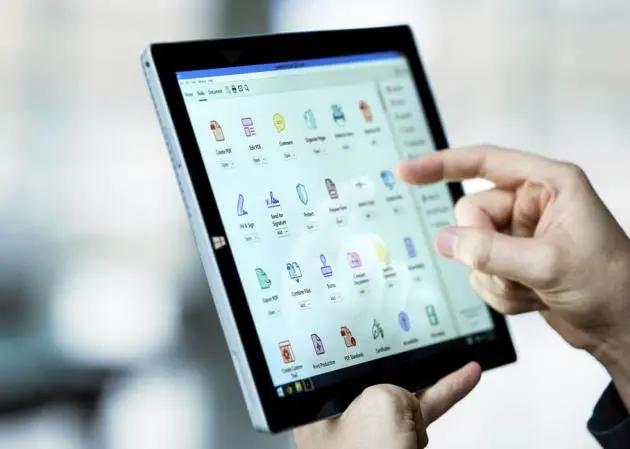
The Pro DC tools appear in the right panel of the application window – Edit PDF, Export PDF, Comment, Organise Pages, Protect, Fill & Sign, Prepare Form, Send for Signature and Send & Track.
The Edit tool is for making changes to papers and PDF documents, even when the source file isn’t available. Adobe imaging magic recreates the fonts even if they’re not featured on your computer software. And you can recycle any document for better productivity.
Text can be edited in boxes, and if you run out of room, just drag the box handles out. Making changes to an existing or numbered list, you can add new lines without having to restructure the whole layout. Working within nested outlines is a breeze.
PDF files can be exported as Microsoft Word, Spreadsheet or PowerPoint, as an image, an HTML Web page, in Rich Text Format or XML 1.0.
Create a new PDF document by using first your mobile phone or tablet to take a picture of any given form and then the “Prepare Form” tool to convert it into a PDF file. Then you choose your options for collecting signatures by ticking “This document requires signatures”.
The tools can be searched by name from anywhere in the application. Select the Tools menu and type the name, and it will appear in a new window, ready for use. And the toolbar can be quickly customised. Delete shortcuts for tools you don’t use from the right pane by hovering over them with the cursor and clicking the “X”. If you later need any of them back, go to Tools again and then “Add”, choosing the right one from the dropdown menu.
Meanwhile the new Heads-up Display provides convenient access to common viewing controls.
The Document Cloud service is really convenient for storing your work for ready access anywhere, without having to trek to your office. And that can only help you respond to the needs of your customers better.
An Acrobat DC Pro subscription costs US$14.99 (Bt508) a month. Acrobat DC Standard is $12.99 (Bt440) a month.
System Requirements
Windows
1.5GHz processor or faster
Microsoft Windows Server 2008 R2, 2012 or 2012 R2 for 64-bit, Windows 7 (32- and 64-bit), or Windows 8 (32 and 64)
1GB of RAM
4.5GB of available hard-disk space
1024x768-pixel screen resolution
Internet Explorer 8, 9, 10 or 11; Firefox (ESR)
Video hardware acceleration (optional)
Mac OS
Intel processor
Mac OS X v10.9 or 10.10
Safari 7 or 8 (browser plug-in for Safari supported on 64-bit Intel processor only)
1GB of RAM
2.75GB of available hard-disk space
1024x768-pixel screen resolution
Mobile apps (optional)
Adobe Acrobat DC: iOS, Android, Windows Phone
Adobe Fill & Sign DC: iOS, Android
Adobe eSign Manager DC: iOS, Android
Browser requirements
(Acrobat Pro DC subscription plan, in addition to requirements listed above)
Windows 8 using Internet Explorer 10 or later, Firefox or Chrome
Windows 7 using IE 8 or later, Firefox or Chrome
Windows Vista using IE 8 or 9, Firefox or Chrome
Mac OS X v10.9 or later using Safari 7 or later, Firefox or Chrome
