
The faster route to pure mobility


Play
The Touch P5 from TP-Link folds all your devices into its arms and gets them online in a hurry
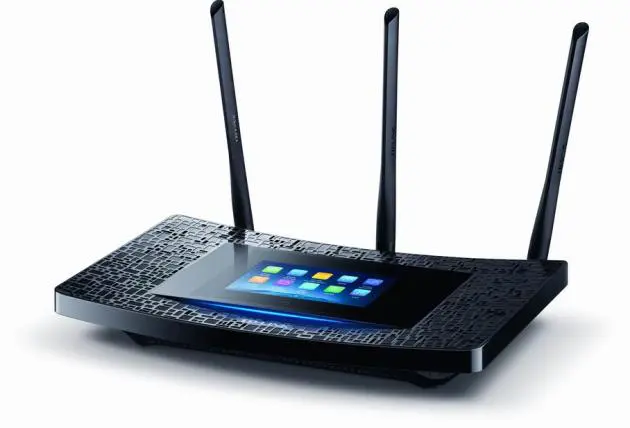
TP-LINK AC1900 Touch Screen Wi-Fi Gigabit Router Touch P5 is a powerful and fast wireless router for streaming 4K HD video and for getting rid of the lag in your online games.
Best of all, it has a 4.3-inch touch screen up top so you can effortlessly set up the router without starting up your computer.
The Touch P5 uses the AC1900 label because it supports wireless 802.11ac protocol with a maximum bandwidth of 1,300Mbps at 5GHz frequency, as well as 802.11n protocol with 600Mbps at 2.4GHz.
The power comes from a 1GHz dual-core processor, so it can handle multiple tasks and data packets without slowing down, making the router ideal for HD video streaming.
Since it has dual bands of five and 2.4GHz, you can have two router names connecting. This means you can connect any Internet TV with an AC wireless capability to the 5GHz band for streaming 4K video, or else reserve that band for playing lag-free video games while using the 2.4GHz band for sending mail and browsing the Web.
The Touch P5 has three external antennas with high-powered amplifiers to increase range and signal stability. It further extends its coverage with Beamforming technology to locate wireless devices and form stronger, more reliable connections, even with mobile devices moving from room to room.
The touch screen makes setting up the router simple. I managed to get it up and running in less than five minutes.
I simply connected the router’s 1-gigabit WAN port to the LAP port of my ADSL modem and turned on the router. The Touch P5 then prompted me to change the router’s administration password from the default one, using its touch panel.
Then the Touch P5 connected to my modem and automatically adjusted its Internet protocol to my True Online Web connection. I simply needed to key in my user-name and password, also using the touchscreen.
The router was now online, and I made the P5’s SSID (Service Set Identifier) the same with my current router’s, and used the same password so that all my devices could reconnect to the Net without having to change the password on each one. I used the same SSID for both bandwidths and let my devices choose the bandwidth according to their own capability. All the devices reconnected to the Net in a breeze.
The touch screen also provides icons for quickly accessing and managing network settings. You can modify parental controls, add or remove devices from your network and change guest-access privileges. The Touch P5 allows you to set two guest networks, one for each bandwidth.
When the touch screen is not in use, it can function as a clock.
In my test I found that the router had very good coverage. My notebook computer connected to the P5 using the 2.4GHz bandwidth and managed to get the full five-level signal strength, even though it was in a second-floor bedroom and the router was downstairs in the living room.
When I used a Macbook Air with the 5GHz connection, it found the five-level signal strength up on the rooftop (equivalent to the third floor at my place).
The Touch P5 has one USB port that’s good for both USB 3.0 and USB 2.0 protocol. It can be connected to either an external hard drive or a printer. When a printer is linked up, the router will automatically turn it into a network printer without requiring any complex computer codes. You just need to download and install TP-LINK USB Printer Controller Utility software on your notebook and you’ll be able to print wirelessly.
When you connect an external hard drive to the P5, you can share the storage and content on the drive with all devices in your home. You type “\\\\Touch_P5-share” in the network neighbourhood address or the folder address to get access to the networked drive.
The TP-Link AC1900 Touch Screen Wi-Fi Gigabit Router Touch P5 has a suggested retail price of Bt7,900.
Key specs:
- Interfaces: 4x10/100/1000Mbps LAN Ports, 1 x 10/100/1000Mbps WAN Port, 1 x USB 3.0/USB2.0 Port
- Buttons: Power on/off, Reset
- Antennas: Three dual-band, detachable
- External power supply: 12V/3.3A
- Touch screen: Capacitive 4.3-inch with 128ppi resolution
- Wireless standards: IEEE 802.11ac/n/a 5GHz, IEEE 802.11b/g/n 2.4GHz + 256QAM
- Frequency: 2.4 and 5GHz bands
- Signal rate: 1300Mbps at 5GHz, 600Mbps at 2.4GHz
- Wireless security: 64/128-bit WEP, WPA/WPA2, WPA-PSK/WPA-PSK2 encryption
- USB sharing: Support Samba (Storage) / FTP Server / Media Server / Print Server
- Dimensions: 284x157x52mm
