
Enhance, expand, enjoy
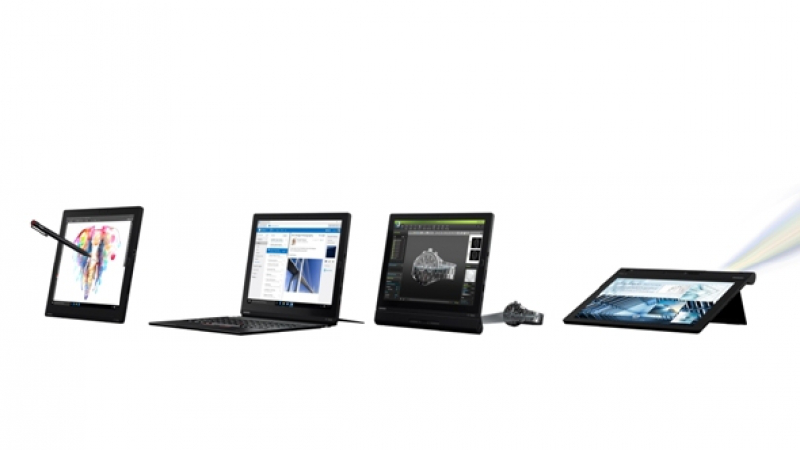


Lenovo creates a tablet that can also function as a notebook and a projector
A TABLET that fancies itself as a laptop and a projector, the new ThinkPad X1 Tablet from Lenovo is a hybrid with a variety of clip-on modules.
For example, connect it to the Productivity Module and you immediately get more battery time. The tablet itself has a built-in battery with a usage time of up to 10 hours and the Productivity Module increases the battery life by up to five more.
Add the Presenter Module and it evolves into a pico projector with an HDMI port.
The pico projector is really fun to use and allows you to present your work on a big screen or play HD movies on the tablet and display the pictures on a huge screen. The projector module is capable of showing a 60-inch display at a distance of two metres from the projector screen.
The HDMI port has two switchable functions – HDMI-in and HDMI-out. You can use the HDMI-out function to play HD movies on the tablet while watching them on a large screen LED TV. Or you can use the X1 Tablet’s screen as a display for other devices such as a 4K video camera with HDMI output.
Used as a tablet, the ThinkPad X1 is powerful. Several versions of the X1 Tablet are available and vary according to the CPU, memory and storage configurations.
The one I tested was powered by the Intel Core m-5-6Y57 CPU running at 1.10 GHz and equipped with 8 gigabytes of DD3 RAM or working memory. It uses Samsung 512GB SSD as internal storage. And the tablet runs on Windows 10 Pro.
The tablet comes with a large, bright and sharp display – a 12-inch IPS touch panel with 2160x1440-pixel resolutions in 3:2 ratio.
The ThinkPad X1 is skinny too, boasting a footprint of just 291x209.5x8.4mm and a weight of 770 grammes. When used with a provided keyboard, which folds out as a front cover, the thickness increased by 5.2mm and 30g are added to the weight.
The keyboard is really useful as it turns the tablet into a laptop computer. The full size ThinkPad keyboard with the iconic TrackPoint has three adjustable typing angles and recreates the classic ThinkPad keystroke feel. The keyboard can be easily snapped into place with a magnetic connection.
The tablet has a built-in stand at its back so that you can position the computer in a position that’s comfortable for typing.
Moreover, while the tablet is connected to the keyboard, you can simply fold it to the back of the tablet and the X1 will ask you whether to change its mode to a tablet mode so that the keyboard can stop functioning. The process reverses when you move the keyboard to the front.
The X1 Tablet is suitable for an executive on the go thanks to a nano SIM slot that supports LTE 4G connection. This allows you to work on your projects on the move without having to look for Wi-Fi hotspots.
The X1 Tablet is also business-ready because it comes with security features like Touch-Sensor fingerprint reader and remote manageability features like Intel vPro and Active Management Technology.
The tablet has one full-size USB 3.0 port, a USB Type-C port for recharging its battery, a Mini Display Port, and headphone jack. Its nano SIM slot and microSD slot are located at the back behind the stand.
The X1 Tablet uses the Intel 8260AC adapter to provide Wi-Fi 802.11 connection. I had no problem connecting it to my Linksys WRT1200AC router for fast Internet connection.
During the test, I found that the X1 Tablet had good performance. Business applications ran fast and smoothly. Video clips also played smoothly. The tablet started up and shut down in a snap.
I encountered no difficulties mounting the Productivity and Presenter Modules. The projected images looked sharp and clear on my wall during the test.
Lenovo ThinkPad X1 Tablet has a starting price of Bt60,000, depending on configurations. The expandable modules have to be pre-ordered and the prices will vary according to the number of ordered units.
Processor: Intel Core |m-5-6Y57 CPU 1.10 GHz r
Operating System: |Windows 10 Pro 64-bit
Graphics: Intel HD Integrated Graphic
Memory: 8 GB LPDDR3
Storage: 512GB SSD
Battery: Up to 10 Hours with tablet only and up to 5 Hours from Productivity Module
Display: 12-inch 2160 x 1440-pixel IPS, 3:2 ratio
I/O (Input/Output) Ports: 1 x USB 3.0, 1 x USB Type-C Power Delivery, Mini DisplayPort, microSD, headphone, |Nano SIM
Wi-Fi: Intel 8260AC+BT 2x2 vPro MB
Mobile Broadband: Qualcomm SnapdragonTM X7 LTE-A (Sierra EM7455)
Dimensions (W x D x H): Tablet: 291 x 209.5 x 8.45mm; Keyboard: 290 x 228 x 5.2mm
Weight: Tablet: Starting at 0.77 kg, Keyboard: |Starting at 0.30 kg
