
Never get lost again


Play
Toyota's new app beats reading the map upside down
Launched to mark Toyota’s 50th anniversary in Thailand, the smart G-BOOK from Toyota is a turn-by-turn voice-narrated GPS navigation application that will help you to reach an unfamiliar destination.
Unlike other GPS navigation software, smart G-BOOK lets you call the smart G-BOOK call centre and have the GPS coordinates of your destination sent to your smart phone without having to manually search or key in information on your own.
The app has a special button that makes the call to the call centre and you then tell the phone operator where you want to go. The operator will search for the GPS coordinates and these will be sent to your G-BOOK’s inbox.
When you open the inbox, the G-BOOK will use the coordinate to calculate the shortest and best way to your destination. The best way will also take account of current traffic information and suggest the route that avoids traffic congestion.
The G-BOOK fetches the current traffic information from the Intelligent Traffic Information Center Foundation or iTIC. Toyota says the information from iTIC is only about 68 per cent accurate but adds that it’s the best available in Thailand.
The operator service of G-BOOK is very convenient because it may be inconvenient for you to tap your smart phone to search for your destination’s GPS coordinate. When you use the operator service, the operator can send up to five GPS coordinates to your phone per one call. The call centre provides the destination searching services only for places in Thailand.
Another nice feature of G-BOOK is that you do not have to stay online if you do not want to update the current traffic data from the iTIC server.
You simply turn on the GPS of your smart phone and use the navigation function after the operator sends the GPS coordinates to your phone.
The capability to work offline is useful in remote provinces where 3G connectivity in unavailable.
During the demonstration at The Nation newsroom, a Toyota staff member called the smart G-BOOK Call Centre and asked for the coordinates of the Ancient City in Samut Prakan to be sent to his iPhone.
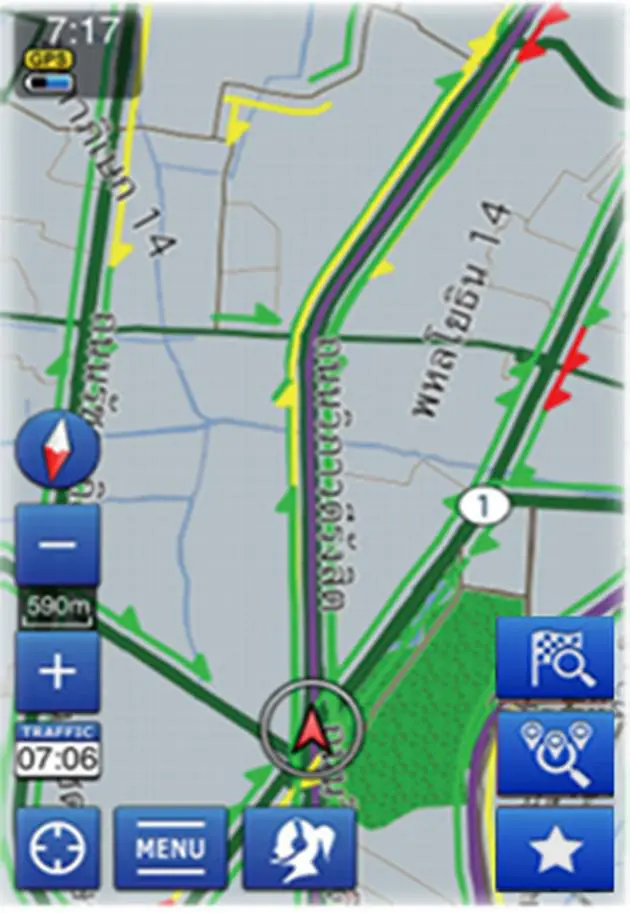
The G-BOOK set up the easiest route for driving to the Ancient City and displayed the street map, our current location and simulated our driving along the chosen route.
The map automatically zoomed in when our simulated car approached the intersection before making a turn.
A female voice also guided us to make a turn at each intersection. The map showed the distance in kilometres to destination and estimated time for reaching the destination.
To prevent you from missing the turn, G-BOOK map helpfully displays the distance to the turn in metres.
According to Toyota PR officials, G-BOOK was initially installed as the on-board navigation system in certain top models of Toyota vehicles in Japan to help and locate customers in time of need.
Now, Toyota has developed the navigation system for use on iPhone and Android-based smart phones under its “Fun to Drive” concept.
Wichien Emprasertsuk, executive vice president of Toyota Motors Thailand, says the Thai version of Toyota smart G-BOOK has been further developed by adding two more functions called G-Road and G-Life.
The G-Road button will call the G-BOOK Call Centre and the operator will coordinate with a road emergency centre to provide necessary repair services to your car by sending your current location to the emergency centre.
The G-Life button will call the smart G-BOOK Call Centre to coordinate with the emergency medical health centre to send an ambulance to your current location.
Apart from using the operator service, you can also use the Spot Search function to look for recommended restaurants and interesting tourist destinations.
If you prefer to search for your destination’s GPS coordinates on your own, there are several ways to do this using the Navigator function of smart G-BOOK.
For example, you can search by using the street name, the street address, the phone number of the place or the place name.
For more fun go to the e-ToyotaClub web site (www.e-toyotaclub.com) and plan your route using the Trip Planner function. You need to key in the ID and password of your smart G-BOOK account and the location of the places you want to go will be saved onto the G-Memory section of your smart G-BOOK application.
The G-Memory can save up to 100 destinations received from operator service or using the Trip Planner.
Toyota Motors Thailand is distributing three versions of smart G-Book.
The smart G-BOOK Lite is distributed as part of marketing campaign and to customers who buy Toyota Vios and Toyota Vigo smart Cab. The G-BOOK TH version can be bought for Bt1,000 from App Store and Google Play.
The smart G-BOOK DA is handed out to buyers of Toyota Altis, Toyota Vigo D-cab and Toyota Fortuner.
You don’t have to own a Toyota car to use it but you can download a 30-day trial version from App Store or Google Play. Toyota is also giving away 5,000 free codes for one-year service, worth Bt1,000 each.
The smart G-BOOK requires at least iPhone 3GS and a smart phone running on Androids OS 2.3.4. So far it does not support Android 3.x and 4.x or tablet computers.
