
Printer for the pocket


Play
LG makes life easy by allowing you to print photos from your mobile
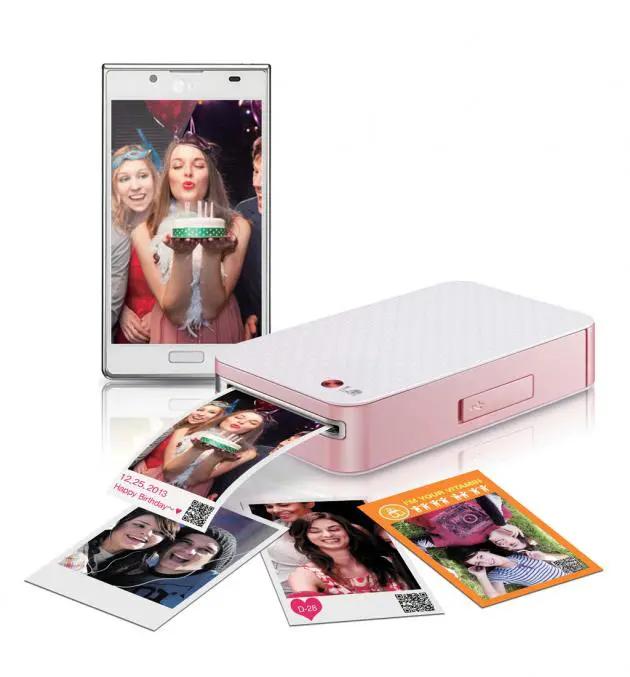
Ever wanted to instantly print a moment captured on your smart phone? Well, now you can. All you need is an Android-based smart phone and LG’s Pocket Photo mobile printer (PD221) and you’ll be sharing prints in seconds.
The Pocket Photo uses special paper from Zero Ink that can print photos without using any ink or ribbon.
Zink Paper from Zero Ink is an advanced composite material composed of multiple layers of colour-forming chemistry, including proprietary cyan, yellow and magenta dye crystals. The multiple layers are coated as a thin “stack” onto a base layer and finished with a protective polymer overcoat to keep out moisture and UV light. The imaging of colour takes place between these layers, which when combined, are the thickness of a single human hair.
Zink paper is made of three layers of specially designed dye crystals protected by a clear overcoat. Inside the LG Pocket Photo is a mechanism containing micro heaters that activate the dye crystals, developing the white Zink paper into a Polaroid-like paper.
However, don’t expect photos printed by the Zink technology to look as clear and defined as those professionally developed.
The LG Pocket Photo is capable of printing in 640 x 1224 pixels on each 2x3-inch sheet.
Each pack of Zink paper contains 10 sheets of paper plus a blue Smart Sheet for cleaning the printing head. The operation of the printer is simple. You simply feed the entire pack of the paper sheets into the LG Pocket Photo via the front door and the paper sheets will come out from the slot on the opposite side.
To use the printer, you will need to download and install the LG Pocket Photo app from the Google Play Store. Then, you can specify whether you want to print via Bluetooth connection or NFC (Near Field Communication) connection.
You use the Pocket Photo app to locate the photos you want to print – one photo at a time. The app also has filters for adjusting the colours of your snapshots and you can also stamp dates and put photo frames on the snap shot before printing it.
The app also allows you to print QR code on the photo and print up to four photos on the same paper as well as printing a business-card side photo or photos 35x45mm in size for a passport or ID.
The LG Pocket Photo printer performs well. According to LG, each photo takes about 40 seconds to print. In our test, the printing time was about 37 seconds. The Bluetooth connection took about one second to send the photo to the printer while NFC connection was swift and much faster. When you order a print with the NFC connection, simply open the photo you want to print and gently tap your phone with the printer and the photo will be swiftly transferred.
The LG Pocket Photo has 500 mA Li-Polymer battery. When fully charged, the LG Pocket Photo is fully mobile with a similar size to a smart phone but considerably thicker. With a fully charged battery, the printer is capable of printing about 20 copies using Bluetooth connection.
LG Pocket Photo retails for Bt5,990. LG Thailand has yet to set the prices of Zink paper pack but you can also use a 30-sheet pack of Polaroid PoGo 2x3-inch Zink paper, which retails on www.WeLoveShopping.com for Bt550.
Key specs
_ Resolution: 640 x 1224 pixels
_ Battery Type: Li-Polymer(7.4V , 500mA)
_ Print Copies: 20 copies (BT connection once fully charged), 15 copies (USB connection once fully charged)
_ Printing Speed: 40 seconds/copy
_ Full Charge Time: 1 hour 30 minutes
_ Power Consumption (Avg): 15.91 W
_ Size (W x H x D): 72.4 x 120.9 x 24.0 mm
_ Weight: 212 g
