
The screen for all seasons


Play
Asus comes up with a new professional 27-inch monitor that allows you to work and have fun at the same time
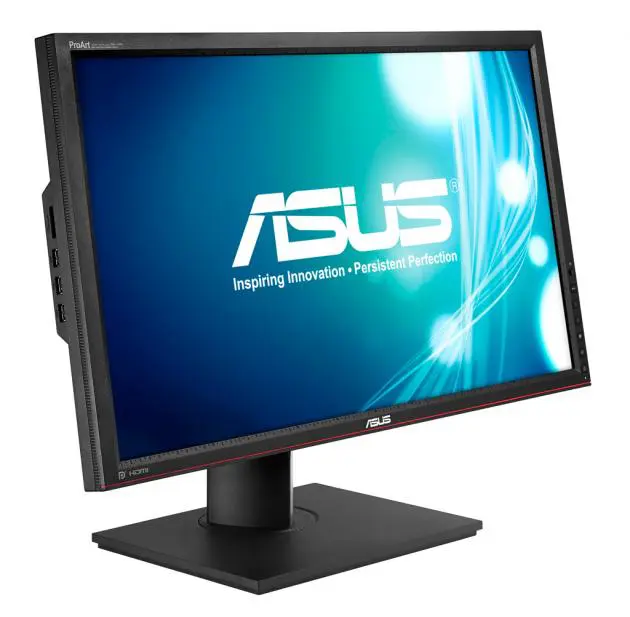
Asus recently made working easier on the eyes with the launch of its professional 27-inch display screen, the PA279Q ProArt Series WQHD LCD Monitor.
Factory pre-calibrated for colour precision, straight from the box, the PA279Q has a native 2560 x 1440 WQHD (Wide Quad High Definition) resolution with 109 pixels per inch (PPI) for greater image detail and a larger on-screen working area. What’s more, it uses AH-IPS (Advanced High Performance In-Plane Switching) display technology to provide a bright and vibrant image with 178-degree wide viewing angles.
The monitor can be connected to display sources with a DisplayPort connector, an HDMI port or a dual-link DVI-D port.
To make most of the monitor, you need a graphic adapter with DisplayPort that’s capable of displaying 2,560 x 1400 pixel resolution. Using the DisplayPort connection gives you another benefit too. You can work on your computer while watching a Full HD movie from your Blu-ray or a satellite set-top box using HDMI connection.
The PA279Q has picture-in-picture mode that allows you to display content from your computer connected with a DisplayPort and a HD movie in a window in one corner of the screen connected with an HDMI port. You can also use the picture-by-picture mode that splits the screen down the middle to display content from two separate sources side-by-side. Do note though that the monitor does not support PIP or PBP modes while connecting DVI and HDMI sources at the same time.
Another benefit of the DisplayPort connection is that it allows users to daisy chain up to three monitors for a multi-display workstation from one video source. The package comes with a Mini-DP to DP cable for connecting to another DisplayPort monitor.
The PA279Q also features two built-in 3W stereo speakers, which I found powerful enough for watching Blu-ray movies with the volume set at just 50 per cent.
The PA279Q has features that make it more convenient for you to access your data on SD card and USB drives. These include a built-in multi-format memory SD card slot and a six-port USB 3.0 hub for convenient pass-through connectivity at speeds up to ten times that of USB 2.0, with compatible devices. One USB port also supports SuperSpeed Battery Charge for accelerated USB device recharging.
To use the USB 3 hub and SD card slot, you need to connect a USB 3.0 cable (provided with the package) to your computer’s USB 3.0 port.
The PA279Q features independent six-axis colour control with impressive colour space reproduction – 99 per cent Adobe Wide Gamut RGB, 100 per cent sRGB and 120 per cent NTSC.
In addition, the PA279Q supports Gamma 2.2 for PCs and Gamma 1.8 for Mac; and has 10-bit “deep colour” for more natural transitions between different hues.
The PA279Q also features brightness rated at 350 nits and 100,000,000:1 ASUS Smart Contrast Ratio for enhanced image contrast to deliver the darkest black and brightest white shades. A monitor hood attachment is also supplied for shielding the display from bright ambient light for even greater colour accuracy.
Unfortunately, my old graphic adapter didn’t support PA279Q’s native 2560 x 1440 WQHD resolution and doesn’t have a display port. I therefore connected to the monitor using a DVI-D port and set the monitor display at 1,920 x 1080 pixel resolution.
That gave me plenty of working space to work in multi-windows. When I translated documents, I could conveniently display the Word window I was writing on alongside with the Word window of the original file and still have space left to monitor my Facebook page.
The text looked crisp and photos were displayed in bright and beautiful colours with sharp details, especially when I edited on Adobe Photoshop.
I connected the monitor to my Samsung BD player and found the movie impressively sharp and clean.
The ASUS PA279Q includes a host of exclusive ASUS features that allow professional users to get the best results. ASUS QuickFit Virtual Scale displays on-screen guidelines for an actual-size preview of images prior to printing and two user-customisable shortcuts for frequently used monitor controls, doing away with the need to navigate the full on-screen menu system for functions such as brightness control.
However, I found myself wishing PA279Q came with a remote control that would allow for setting adjustments more conveniently than by using its menu button and five-way control on the monitor.
The PA279Q is also VESA-wall mount compliant and comes with a versatile stand with full tilt, swivel, pivot, and height adjustment.
Asus Thailand has yet to set the retail price for the PA279Q but a company source said it should cost less Bt29,990.
Key specs
_ Display size & type:27-inch (2560 x 1440 WQHD) AH-IPS panel with 16:9 aspect ratio
_ Pixel pitch: 0.2331mm (109 pixel per inch)
_ Colours (maximum): 1.073 billion (10-bit RGB)
_ Viewing angles: 178 degree (H) / 178 degree (V)
_ Brightness (maximum): 350 nits
_ Contrast ratio: 100,000,000:1
_ Response time: 6ms (GTG)
_ Colour space & accuracy: 99% Adobe RGB/ 100% sRGB/ 120% NTSC on CIE1976 or 103% NTSC on CIE 1931 test standards
_ Colour control: Six-axis (R,G,B, C,M,Y) independent adjustment
_ Colour temperatures: 5000K, 5500K, 6500K, 9300K
_ Other controls: ASUS QuickFit Virtual Scale, Picture-in-Picture, Picture-by-Picture, 5-way navigation key, two customisable shortcuts
_ Gamma adjustment: 2.2 for Windows / 1.8 for OS X
_ Stereo Speakers: 3W x 2 stereo, RMS
_ Inputs/outputs: DisplayPort In, DisplayPort Out (with multi-display daisy chaining), HDMI, dual-link DVI, 3.5mm audio-in, 3.5mm audio-out
_ Six-port USB 3.0 hub (one with nSuperSpeed Battery Charge function)
9-in-1 Card Reader
_ Mechanical design: Tilt +20~-5 degree, swivel +60~-60 degree, pivot 90 degree (clockwise), height adjustment 0~130mm, VESA mount (100 x 100mm)
_ Included accessories: Power, DisplayPort, DisplayPort-to-Mini DisplayPort, dual-link DVI, HDMI 1.4, USB 3.0 and 3.5mm audio cables; monitor hood
_ Size: 640.8 x 559.8 x 240mm
_ Weight: 10.2kg
