
The right connections


Play
A smart wi-fi router from Linksys allows you to stream full HD videos and monitor your child's access to the Internet
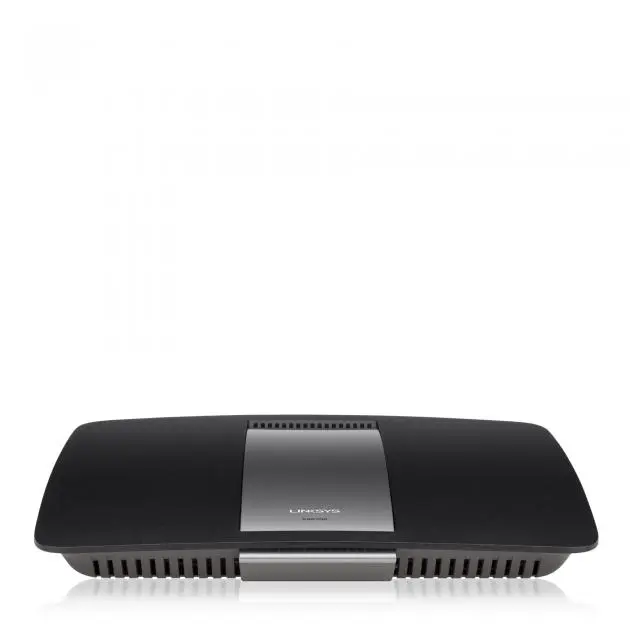
Armed with new wireless-AC technology that allows you to stream HD video smoothly in your home network, the Linksys Smart Wi-Fi Router EA6700 is the perfect solution for home with multiple devices.
It’s app-enabled too, allowing for monitoring and management through an iOS or Android smart phone as well as a web page.
Not so long ago, a router with Wireless-N technology such as the IEEE 802.11n was fast enough for streaming multimedia and video content. That Wireless-N technology has a throughput of up to 450 megabits per second (Mbps). But now that Full HD videos have become a common format for household use, the 450 Mbps is rarely enough to ensure smooth streaming, especially when the wireless bandwidth is also shared with other connections.
Of course, it would all be fine if your smart TV or HD network player were wired to the router with a Gigabit connection. But if, as usually the case, the network player is located far from the router, you will need the Wireless-AC technology or IEEE 802.11ac with its throughput of up to 1.3 Gbps. In short, Wireless-AC technology is 3x faster than Wireless-N.
But to achieve the 1.3 Gbps speed, you will need a wireless adapter, which also supports Wireless-AC technology, to connect the network media player or smart TV to the EA6700.
The EA6700 supports both Wireless-N and Wireless-AC technologies so it is backward compatible with 802.11n devices. It has simultaneous dual-band 2.4 and 5 GHz, which double the network bandwidth to avoid interference and maximise throughput. The Wireless-N devices are connected to the router using 2.G GHz while the wireless-AC devices use 5 GHz bandwidth. The router is also compatible with Wireless a/b/g devices.
EA6700 has six internal antennas and its high-powered signal amplifiers deliver ultimate range and performance. Another major advantage is that is comes with two USB ports – a USB 3.0 and a USB 2.0, allowing you to connect a printer to the USB 2.0 and your USB 3.0 hard drive to the router’s USB 3.0 port to use it as a media server
Plug the USB 3.0 drive into the port and the router will turn it into a DLNA (Digital Living Network Alliance) without your needing to become involved in complicated computer instructions. The E6700 has a built-in DLNA Media server that enables media streaming to your DLNA-certified TV, Xbox, PS3 and other DLNA compatible devices. For example, during the test, my Motorola smart phone, which is DLNA compatible, could easily access music files in my portable hard drive connected to the EA6700.
The router was also very easy to set up. I simply connected an Ethernet cable from my ADSL model to the WAN or Internet port of the router. For certain Internet protocols of some Internet provides, the router might automatically import the protocol and automatically set up the connection. But for my True Internet’s Point-to-Point Protocol over Ethernet (PPPoE), I needed to manually select the protocol and enter my username and password before the router linked to the Internet.
To access the router in order to change the settings, I typed “linksyssmartwifi.com” or “192.168.1.1” at the browser’s address and the setup screen showed up. I then changed the SSID (Service Set Identification) – the public name of the router – and the wireless password to the SSID and password of my own router and all the devices that normally connect to my wireless home network connected to the new router.
The EA6700 also has four Gigabit LAN ports for wired connection to desktop computers or other devices near the router.
When you bring up the router management page by typing the linksyssmartwifi.com address on a web browser, you will see several management options.
One option is to allow your visitors to connect to your wireless guest network and access Internet without gaining access to your other computers and personal data. You can set the guest network SSID and password.
The management page also shows a list of the devices connected to your home wireless network.
You can use the Parental Controls option to easily restrict Internet access on certain devices, such as your child’s iPhone or notebook computer. It’s simple to do too, as you just select a device on the list and tick whether to always block its Internet access or restrict the access to specific times.
Another useful utility is Media Prioritisation, which you can use to give priority to devices, applications and games. Drag the name of the device to which you want to give priority to the High Priority list and then can set applications and games to receive high priority.
During the test, I had no Wireless-AC adapter so I tested the router with my Wireless-N devices. The connections were smooth and transfers of files between the hard drive connected to the router and my desktop and notebook computers connected to the router with Wireless-N adapter were fast.
Linksys Smart Wi-Fi Router E6700 has a suggested retail price of Bt7,000.
Key specs
_ Technology: Wireless-N & AC
_ Bands: 2.4 & 5 GHz
_ Transmit/Receive: 3x3 & 3x3
_ Antennas: 6 Internal
_ Ports: 4 x Gigabit LAN, 1 x Gigabit WAN, 1 x USB 2.0 + 1x USB3.0
_ Wi-Fi Protected Setup: Wi-Fi Protected Setup push button
_ IPv6 Support: Native IPv6 and 6rd support
_ OS Compatibility: Windows, Mac
_ Minimum System Requirements: PC: WI-FI enabled with CD or DVD drive, Windows XP SP3, Windows Vista SP1 or later, Windows 7, or Windows 8; Mac: WI-FI enabled with CD or DVD drive, OS X Leopard 10.5.8 or later, Snow Leopard 10.6.1 or later, Lion 10.7 or Mountain Lion 10.8
_ Internet Browser Requirements: Internet Explorer 8, Safari 5 (for Mac), Firefox 8, or Chrome configuration
_ Package Contents: Linksys Smart Wi-FI Router EA6700, CD-Rom with Documentation, Ethernet cable, Quick Start Guide, Power adapter,
SimpleTap card
