
Lights, camera, action


Play
Samsung's new and improved NX30 will impress even the most serious shutterbug
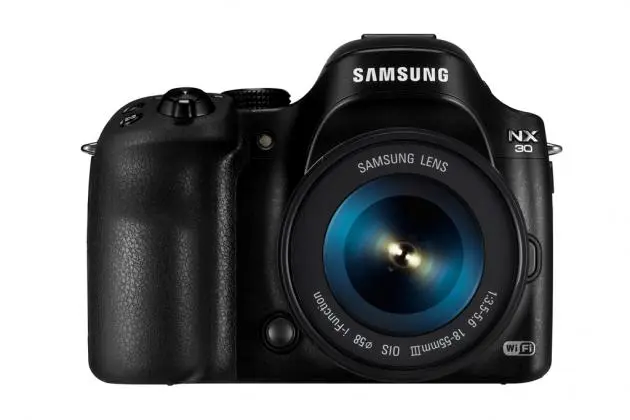
A new flagship mirrorless interchangeable lens camera with good image quality, a fast hybrid focusing system, an impressive electronic view finder and an articulated monitor, the Samsung NX30 doesn’t just replace the NX20 but also brings with it a number of improvements. They include a pull-out EVF that can be tiled, a better quality Super AMOLED display, better video recording capabilities and much more convenient Wi-Fi connection features.
Moreover, NX30 is more comfortable to hold thanks to its new grip design that also provides a thumb rest on the rear.
The tilting EVF is a significant design change. With this new feature you can pull the EVF away from the camera body and tilt it upwards as much as 80 degrees. This feature is very useful when you need to shoot at a low angle under sunlight.
Pull out the EVF and you’ll see the diopter adjustment dial that allows you to adjust the electronic viewfinder to suit your eyesight.
The 3-inch Super AMOLED display with a resolution of 1.03 million pixel is great for composing photos and the monitor is 33 per cent brighter than the NX20’s display.
Moreover, NX30’s monitor can be swung outward and rotated 180 degrees upward or 90 degrees downward for high-and low-angle composing and for self portraits.
NX30 comes with built-in Wi-Fi adapter and Smart Camera 3.0 functions. These allow you to link it with Wi-Fi to a smartphone and download Samsung’s new Remote Viewfinder Pro and Samsung Smart Camera apps for controlling exposure and camera settings.
The Wi-Fi connection can be easily achieved because the NX30 supports NFC (near field communication). You simply tap the phone to the camera and the wireless linking is automatic.
Features that come with the Wi-Fi connection include the ability to transmit photos in reduced resolution to your phone so that you can upload them to your Facebook page or share via other social networks with 3G connection instantly.
And when NX30 is connected to a Wi-Fi hotspot, you can upload photos from the camera to your Facebook, Picasa, Flickr accounts or back up them to your Dropbox online space. You can also upload your video clips to YouTube and email photos to your friends directly from the camera.
Another nice wireless feature is that you can use NX30 with a smartphone as a baby monitor. You simply position the NX30 on a tripod to monitor, use the Baby Monitor function to link with a smartphone and you can watch the baby’s movements on the phone.
Thanks to its large 20.3 megapixel CMOS sensor and support for on-chip phase detection, AF. NX30 captures excellent quality photos. The sensor has a 1.5x crop factor, so its 18-55mm kit lens has equivalent focal length of 27-83mm, allowing the camera to capture beautiful landscapes and portraits. And the lens has optical image stabilising to ensure that shots are sharp and not blurred.
The Hybrid AF system with 105 phase-detect points and 247 contrast-detect points means that the NX30 has very fast auto focus.
And the camera is capable of firing a shutter speed of 1/8000 second with the electronic shutter speed option making it easy to freeze fast actions. It can also capture up to 9 frames per second of photos in continuous-shooting drive mode.
The camera is easy to operate with a mode dial, navigation button, dedicated drive mode dial, a metering button, a direct link button for Wi-Fi functions, an exposure adjust button, and a customisable function button.
Enhancing ease of use is the touch-screen display that lets you conveniently interact with menus. You can also use the touch screen to browse through the shots. And best of all, you can use touch focus function with the touch screen by touching the point on the screen where you want to focus.
The mode dial provides instant access to Smart Auto (Auto), Programme (P), Aperture Priority (A), Shutter Priority (S), Manual (M), two custom modes, Lens Priority and Smart mode as well as Wi-Fi functions (apart from the separate Wi-Fi button).
Experienced photographers will enjoy the full manual mode and manual focus. During the test, my friend, an advanced shutterbug, managed to capture sharp, clean and well-saturated coloured photos in manual mode.
I enjoyed shooting with the Smart Auto mode and had no problem capturing sharp and clean shots in beautiful colours. In this mode, the camera recognises surrounding conditions and automatically adjusts factors for proper exposing.
The Lens Priority mode works with Samsung’s i-Function lens. You just press the i-Function button on the lens and select Depth, Contrast or Zoom. The Depth function allows you to choose depth of field to blur or sharpen background, the Contrast function increases or decreases shading while the Zoom function crops the photo. Adjustments can be made by scrolling the focus ring of the i-Function lens.
While the full Auto mode selects programme scene modes for you automatically, the Smart mode lets you select some scene modes or fun shooting modes on your own.
The shooting modes that are available in the Smart mode include Beauty Face, Best Face, Action Freeze, Rich Tones, Panorama, Waterfall, Multi Exposure, Creative Shot, Silhouette, Night and Light Trace and Smart Jump Shot.
During the test, my female colleagues were very happy with Beauty Face mode, which hides facial imperfections, making the subjects look fairer and younger and blurs the background to make the subjects look more outstanding.
The Best Face mode captures five photos and allows you to select best image from five faces for each subject.
I particularly enjoyed the Night mode, which Samsung appears to have perfected. The camera fires off several shutters to capture multiple shots very fast then combines them to create a single image that is bright and sharp and colourful. I found this mode let me capture lights without any need for a tripod.
The Waterfall and Light Trace modes use the same method – a long exposure of shutter speed that makes the waterfall look like a white trail of water and the lights long colour traces. You need to mount the camera on a tripod to use these two modes.
The Smart Jump mode is a new mode added to the Smart function. Just set an area to capture a jumping subject and the camera will automatically snap a photo when the movement is detected. You can drag the jumping area box on the screen to a desired location and adjust the size of the box.
You can even mount the camera on a tripod and use this mode to capture yourself jumping because when you press okay, the AF-assist light/Timer lamp will blink for 5 seconds to inform you to get ready. When a subject is detected within the box, the camera will capture five photos consecutively. You can set the best image and save it.
The NX30 has very good performance. In the test, it was ready to capture the first shot about one second after turning on. I detected no shutter lag. It takes about 1 second to store a JPEG image so you can keep shooting while the photos are being recorded.
Its Burst mode is very good, allowing you to take 9 frames per second for 45 JPEG images at the highest image quality.
The NX30 can also record Full HD 1080p 1920x1080 video. It has a micro HDMI port for playing the video to your large-screen LCD TV.
The NX30 has a decent battery life, allowing you to capture about 350 shots per one full charge.
Samsung NX30 has a suggested retail price of Bt34,990.
Key specs:
Image Sensor: 20.3 effective megapixel APS-C CMOS sensor
Display: 3.0-inch Super AMOLED Swivel and Touch Display with 720x480 resolution
View finder: Tiltable EVF w/Eye Contact Sensor, (tilting upward by 80 degrees) with XGA (1024x768) resolution
ISO: Auto, 100, 200, 400, 800, 1600, 3200, 6400, 12800, 25600
Shutter Speed: Auto - 1/8,000 seconds ~ 1/4 seconds), Manual - 1/8,000 seconds ~ 30 seconds (1/3 EV step), Bulb (Limit time: 4minutes)
Metering System: TTL 221 (17 x 13) Block segment, Metering - Multi, Centre-weighted, Spot
Focusing point: Total AF Point - 105 points (Phase Detection AF), 247 points (Contrast AF), Selection - 1 point (Free selection), Multi - Normal 21 (3 x 7) points, Close-up 35 points, Face Detection - Max. 10 faces
Video: MP4 (Video: MPEG4, AVC/H.264, Audio: AAC) in 1920x1080, 1920x810, 1280x720 , 640x480, 320x240 resolutions
Connectivity: Wi-Fi IEEE 802.11b/g/n support Dual Channel, NFC
Bundle PC software: iLauncher, Adobe Photoshop Lightroom 5
Storage: SD, SDHC, SDXC, UHS-1
Battery: BP1410 (1410mAh)
Dimension (WxHxD): 127 x 95.5 x 41.7mm (excluding the projection part)
Weight: 375 g (without battery)
Samsung 16-50mm F3.5-5.6 Power Zoom ED OIS Specifications
Focal Length: 16 - 50mm (equivalent to 24.6-77mm in 35mm format)
Elements in Groups: 9 elements in 8 groups (4 Aspherical lens, 1 Extra-low Dispersion lens)
Angle of View: 82.6 degree- 31.4 degree
Aperture: F3.5-5.6 (Min. F22), (Number of Blades : 7 , Circular Aperture Diaphragm)
Optical Image Stabiliser: Yes
Minimum Focus Distance: 0.24m(Wide), 0.28m(Tele)
Maximum Magnification: Approx.0.24X
Filter Size: 43mm
Mount Type: NX Mount
Dimension (DxL): 64.8 x 31mm
Weight: 111g
