
IMAX for the living room


Play
Samsung's new 55-inch curved screen TV brings the cinema into your home
Samsung brings the very latest in smart TV multitasking to Thailand with the introduction of the UA55 HU9000K 55-inch LED-backlit curved screen TV that boasts an ultra high definition of 3,840 x 2,160 pixels.
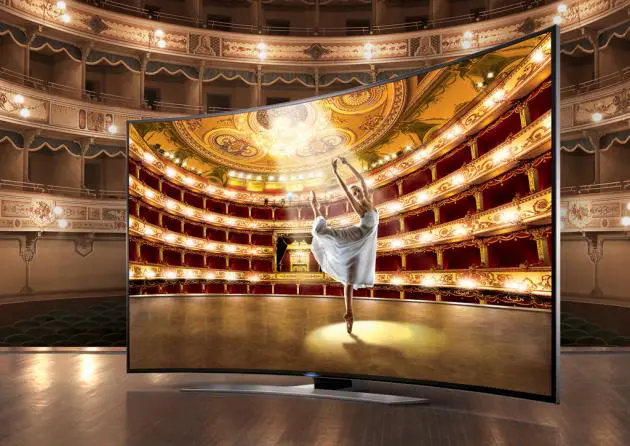
The curved, slim edge of the picture frame, the chromium edge of the screen as well as the hairline aluminium stand turn the HU9000K into a sleek beast that looks great in the living room even when it is switched off.
The curved design, which follows the same lines as the IMAX screen, is totally immersive and you really do feel as if you are right in the middle of the action. Do remember though that you have to position yourself opposite the middle of screen and at less than 1.8-metre distance from the 55-inch display for the full experience.
That said, I quickly discovered that he curved screen expands the viewing angle. I could clearly see the picture from the side view or nearly 180-degree angle of view.
The curved UHD TV comes with Samsung’s Auto Depth Enhancer technology, which applies different levels of contrast enhancement on different areas of the screen, making your entertainment more immersive and enjoyable.
The resolution of 3,840 x 2,160 pixels or 8.3 million pixels is four times higher than the Full HD resolution. Unfortunately during the test, I had no UHD movie source so I tested it with Full HD 1080p Blu-ray movies and 1,080i broadcast from TrueVisions as well as broadcasts from some HD digital TV channels. The 55HU9000K has a built-in DVB-T2 for receiving the signal from digital stations in Thailand.
Samsung says the TV automatically upscales all kinds of movie sources to near UHD-level picture quality but I found the source quality needed to be at least 1080i to make most of UHD TV.
The curved UHD TV uses Samsung’s PurColour technology to display colours in their natural state in a wide range of colours and shades that are as close to real life as possible. Samung says the PurColour has 7 times more colour adjustment points than full HD TV, so obviously you will get more accurate colours.
The HU9000K uses Samsung’s advanced UHD dimming technology to deliver a high level of contrast and colours. The higher resolution of UHD also means that the picture requires more processing for a highly-detailed image and this is supported by Samsung’s UHD dimming technology that has been developed to process black and white as optimally as possible and produce colours that are far more vivid.
The UHD dimming technology and boosted LED backlights in bright areas of the screen give impressive brightness even in the dark scenes.
The HU9000K is also very good for watching fast-action movies thanks to Samsung’s advanced Clear Motion Rate (CMR) technology that delivers fast moving scenes with the Clear Motion rate of 1,200. A higher CMR means clearer viewing and less motion blur, so you can enjoy action films, sports and other entertainment at their very best.
There are four picture modes to choose from depending on the viewing environment. The most useful is probably the Dynamic picture mode, the one to choose when the ambient lighting is too bright.
The three other modes are Standard, Natural and Movie. The Standard is the default mode suitable for most environments and Natural is useful for reducing eyestrain. If you like you watch movies in a darkened room, you should use the Movie mode that darkens the screen to reduce glare.
Best of all, each mode can be further adjusted to suit a particular viewing environment. You can adjust the Backlight, Contrast, Brightness, Sharpness, Colour and Tint as well as Black Tone, Flesh Tone, RGB levels, Colour Space, Gamma and White Balance in advanced settings. You may need an expert to help adjust the advanced picture settings until you get the hang of it.
During the test, I enjoyed using the Standard mode to view HD digital TV channels like Thairath TV. The picture was sharp and clean and the colours were very bright.
I also enjoyed using the Standard Mode to watch TrueVisions’ Discovery HD Channel and History Channel.
I used the Movie mode to watch movies from TrueVisions’ HBO HD channel and from a Blu-ray player. For example, I watched “Terminator: Salvation” one night and was pleased to discover that when the scene turned dark, the TV disappeared into the darkness of the room.
The HU9000K also supports 3D display and its curved screen helps enhance the depth of the 3D pictures. I watched “Captain America: The Winter Soldier 3D” and “Amazing Spiderman 3D” and found them both sharp and clear and with an impressive 3D depth.
The sound quality is also great thanks to 60 watts of front firing power output – 10 watts each for the two tweeters, two mid-range speakers and two woofers. You definitely don’t need to splash out on a soundbar system for a Dolby movie experience.
Since the TV is designed to be slim, it separates input ports from the main TV unit to a compact box – this allows you to more conveniently connect picture sources to the TV. The input box provides four HDMI ports, 2 USB 2.0 ports, 1 USB 3.0 port, 1 composite AV in and 1 Components in as well as a LAN port.
The LAN port can be connected to your router using a LAN cable to enjoy Smart TV functions. It can also be linked wirelessly with a built-in Wi-Fi adapter.
The TV has a built-in camera to allow you to make Skype calls as part of the Smart TV functions. You can also browse web pages and download and install more apps. There’s even a Samsung Karoke app that allows you to sing more than 1,000 songs from the GMM label free of charge. Other apps include Doonang.com for watching online movies from Sahamongkol Film at a price and Samsung Smart TV ShowTime that offers a limited collection of free movies.
The HU9000K uses a quad-core processor to provide multi-tasking in Multi-Link Screen mode that lets you watch movies while enjoying Smart TV functions.
Football fans will be permanently tuned in to the Soccer Mode, which brings the match into the living room by enhancing colours of the field, the sharpness of players and simulating pitch sounds.
Two remote controls are provided for the TV. One of them comes with a touch pad that lets you make most of the Smart TV function.
Apart from using the remote, you can also control the TV with Voice Control and Motion Control functions. For example, you can increase or decrease volume level and change channel simply by using voice commands.
With Motion Control, you can use your index finger to move the pointer, select an item, move the Smart Hub panel, return to the previous menu and zoom in and out, for example.
Of course, none of this comes cheap: Samsung UA55HU9000K has a suggested retail price of Bt129,990.
Key specs:
Screen Size: 55 inches
Resolution: 3840 x 2160 pixels
Picture Engine: Quadmatic
Clear Motion Rate: 1,200
Dynamic Contrast Ratio: Mega Contrast
Micro Dimming: Micro Dimming Ultimate
Precision Black (Local Dimming): Yes
Audio decoding: Dolby MS11, DTS Studio Sound / DNSe+DNSE+, DTS Premium Sound / DTS Premium Sound 5.1
Sound Output (RMS): 60W (Front TW (10W + 10W) + Front Mid (10W + 10W) + Woofer (10W + 10W))
Speaker Type: Front Firing + New Waveguide
Smart TV: Smart Hub, Apps, Social, Skype, Web browser, AllShare control
Smart Interaction: Voice control, camera built-in, face recognition, motion control
DTV Tuner: DVB-T2 / C
Connectivity: 4 HDMI, 3 USB, 1 component in, 2 composite in, Ethernet LAN, Audio out (Mini Jack), Optical audio out, RF in, Wireless LAN built-in
Power Supply: AC100 - 240V 50 / 60Hz
Power Consumption (Max): 272W
Power Consumption (Stand-by): 0.34W
Set Dimension with Stand (WxHxD): 1232.6 x 767.6 x 307.9mm
Set Weight with Stand: 23.8kg
