
Plug in and view


Play
TOT comes up with its own HD IPTV set-top box and lots of great packages for the home viewer
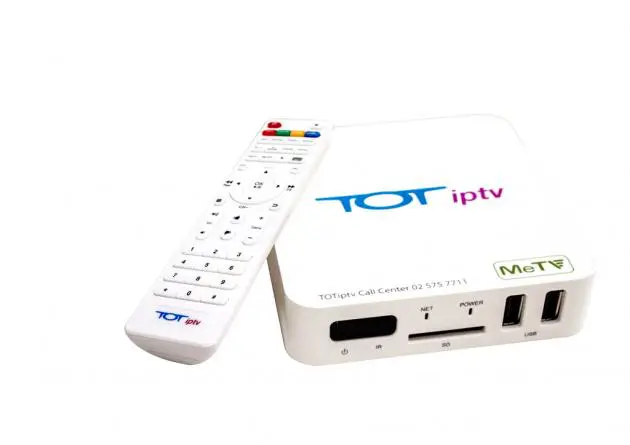
Now you can turn your television into an Android OS-based smart TV simply by purchasing one of a range of packages that comes complete with a full-HD IPTV set-top box from TOT.
The MPA108 box, which ensures you have access to TOT’s Internet-based subscription TV service , is tiny and easy to set up. All you need to do is plug a LAN cable from your home router into the back of box and connect an HDMI cable from the box to the TV and you will be ready to enjoy movies without a satellite dish or cable TV installation.
Since the box runs on the Android 4.0 operating system, it functions like a mini PC. You can connect a keyboard to one of two USB ports on the front to use as the Android PC keyboard on you can use the remote control to click on the letters on the on-screen virtual keyboard.
You can install more Android apps, like games and other online service applications too. The OS also comes with a browser for you to browse web pages on your TV.
Moreover, the set-top box can function as a Full HD player for films stored on an external drive or a USB. It can play popular movie files including MKV, TS and MP4.
Right now, TOT is not distributing its MPA108 box separately. It hands out the set-top box free to its Hi-speed Internet customers who apply for the package, which comes with a monthly fee of Bt590.
Those with the free MPA108 box can enjoy 90 free channels of IPTV service from TOT plus access to more than 100 free online movies. Pay an additional Bt200 a month to access the starting package of TOT IPTV, which offers 20 more premium channels among them Syfy, FX HD, Fox Crime HD and StarWorld HD.
Customers can also access the service from three platforms at the same time.
When you get an IPTV set-top box from TOT, you will have a username and password that can be used to log on to the service from a notebook or desktop computer and from a mobile device like an Android smartphone and tablet computer. This is very useful when you want to watch the free 36 terrestrial digital TV channels provided by the TOT IPTV service on the go.
TOT says it encodes the movies and TV programmes on its service on H264 digital movie protocol to ensure smooth streaming from its IPTV servers. The HD channels have 720p resolution, which is one notch lower than the 1080i resolution of satellite TV and cable TV subscription services. However, convenience of access compensates for this marginally lower resolution.
Initially, TOT provided three choices of packages with the premium one offering access to 145 channels, including 32 HD, for Bt1,300. TOT has how decided to do away with the premium package and distributes the top channels from the package to two lower packages while increasing the price of the two remaining packages.
Those two paid packages are called Choice S Plus and Choice M Plus and the subscription fees are Bt390 and Bt750 respectively.
The Choice S Plus provides access to 135 channels, including Nick Jr., Sun Channel La Liga HD, FOX Crime HD, FOX Thai, Universal HD, Fashion TV, Star World HD, FYI HD and Nat Geo People HD.
The Choice M Plus provides access to 165 channels, including 55 premium channels like Warner TV HD, Sony Channel HD, Channel M HD, MTV Live HD, Edge Sport HD, FyiCi HD, MSNBC, Baby HD, Aniplus HD and Animax.
TOT has also entered into partnership with Mono Film’s Doonung.com for a movie-on-demand service. TOT customers can pay an additional Bt128 per month on top of the package price to get unlimited access to movies through the site or “rent” the movies for Bt15 a pop with access limited to a month.
Although the set-top box comes from TOT, it can be used with hi-speed Internet from other providers, such as 3BB and True Internet. For example, you may subscribe to TOT hi-speed Internet at home and use the box at your condominium, which uses hi-speed Internet from another service provider. TOT says the IPTV service requires a minimum 6-megabit bandwidth.
I tested the TOT IPTV set-top box on my 10-Mbit True Internet account. The box took seconds to set up and the TV channels streamed smoothly with good pictures and sound, which synchronised well. The movie didn’t skip either.
The pictures on the HD channels were not as sharp those on TrueVisions HD, apparently because TOT IPTV uses 720p resolution to ensure smooth streaming. Anyway, TOT says it heeds feedback of its customers and tries to improve the quality of the streamed movies and TV channels.
The set-top box will remember the last channel you have watched. Once the box is turned on again, it will display the main menu screen for a while before bringing up the last channel.
You can browse the channel by type of resolution – standard and HD channels – or by list of channels of your subscribed package. You can also set your favourite channels for easy access.
Movies from the video on-demand service Doonung.com played smoothly and it was handy being able to use the remote to forward and rewind the movie being played. Some movies looked sharp; others not quite as so.
Jantana Techasirinugool, executive vice president of TOT in charge of product development and marketing, says the service currently has about 500,000 members compared to 200,000 last year. She adds that TOT is aiming to raise membership to 1.5 million within 2016.
TOT is also apparently planning to distribute the box separately though no date for this as yet been set.
Key spec
OS: Android 4.0
Video interface: HDMI, A/V, Video Component
Network interface: 10M/100M Ethernet
Ports: Two USB 2.0 ports, HDMI
Display resolution: 1920 x 1080
Video format supported: MP4, MOV, AVI, MKV, M4V, WMV, TS, RMVB, MPG
Subtitle format supported: SRT, SUB
Power adapter: 12V external
Dimension: 120 x 120 x 30mm
