
Walking, talking recording machine


Play
Worn on the wrist all the time, the SmartBand Talk can be your personal assistant and coach
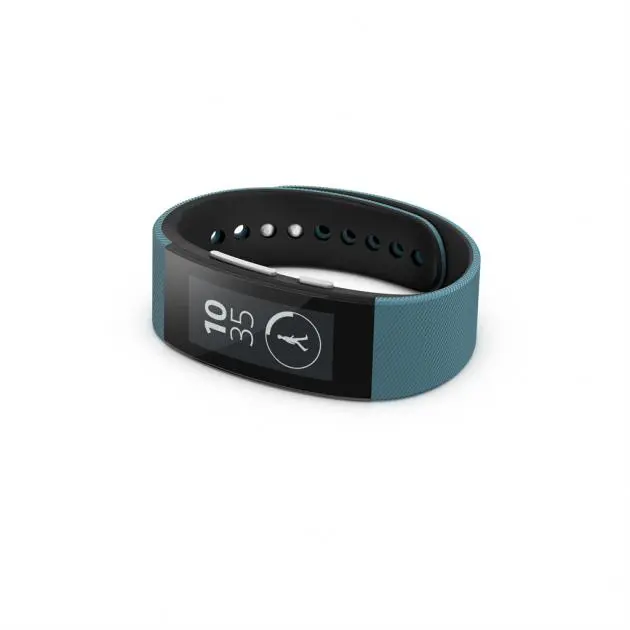
Sony’s SmartBand Talk (SWR30) is a fashionable wristband that functions as a watch and activity tracker while at the same time monitoring your smartphone or tablet.
It features a curved display and is available in black or white. It has voice capability to serve as your hands-free speakerphone system as well. Sony says it will soon release wrist straps in red, pink, blue and lime so you can change the look to suit your taste.
The SmartBand Talk features a 1.4-inch black-and-white display with 296x128 dots. It uses E-ink technology that makes it readable even under direct sunlight.
The package comes with two straps, 68mm and 52mm long. The main unit housing the display is about 23.5mm wide and 9.5mm thick.
The SmartBand Talk works with a smartphone or tablet running on Google Android 4.4.4 KitKat. You just link them up via Bluetooth. The wristband has NFC functions to conveniently set up a Bluetooth connection.
I tested it with a Sony Xperia Z3 tablet. I simply tapped the two devices together and the NFC function established the link without a hitch and prompted the Z3 to download and install the SmartBand Talk app for checking status of the wristband and setting up various settings.
You can wear the SmartBand Talk around the clock – as long as the battery still has a charge. The battery can last about three days or provide an hour’s talking time. It’s easily and quickly recharged using a microUSB cable.
The SmartBand Talk will monitor your approximate steps and time you’ve walked or run. That information is synchronised with the Sony Lifelog app on the linked-up smartphone or tablet, automatically overriding data normally collected by the phone or tablet using the app.
You need to register for a free account with Sony mobile to use the Lifelog. Your personal information – date of birth, gender, height, weight, stride length and running-stride length – will be used by the SmartBand Talk for calculating your steps and accumulated time of your walks and runs.
The main display will show the current time and your progress toward goals each day. You can use the Lifelog app to set the goals for the number of steps and, once you achieve that, the wristband will vibrate and display an image of a trophy.
The wristband doesn’t display calories lost. You need to find that information via the Lifelog app on your linked phone or tablet. In my test I found that, on a day of normal activity, the SmartBand Talk recorded 13,315 steps and my walk time was an hour and 50 minutes.
There’s a power button with which you can also toggle between the home screen and the four default apps – Activity Tracker, Media Player, Call Favourite and Life Bookmark. You can use the linked smartphone or tablet to download more apps, like Weather, which I found useful, especially the forecasts for the next three days.
You interact with most of the apps and functions by tapping firmly on the display. For example, when viewing the current day’s weather details, tap once for tomorrow’s forecast, again for the next day and again for two days hence.
You have a Media Player to control the tracks uploaded to your smartphone or tablet, and the wrsitband’s own volume button will control the volume of any linked handheld as well as its own speaker.
You can adjust the volume of phone calls to your phone or tablet this way too, while listening to your caller on the wristband’s built-in speaker and speaking into its microphone. The Call Favourite function is there to mark particular numbers set via the SmartBand Talk app.
In my recent review of the Sony Xperia Z3 phone, by the way, I erroneously referred to the Lifelog’s Life Bookmark as a way to bookmark Web pages. I apologise for that: Life Bookmark is actually for recording your voice in 10-second clips, a way to record your impressions for later review on the timeline of your Lifelog app.
The SmartBand Talk provides this function as well, making it – on top of everything else – a convenient means of capturing oral memos while on the go.
You can also set the SmartBand Talk to wake you up by vibrating. And, when your linked phone or tablet receives email, SMS or Facebook message, it vibrates and displays the subject line. Tap once for a glance at the message.
The SmartBand Talk is waterproof, so you can wear it while showering. It meets the IP68 waterproof standard, so it can be submerged in a metre and a half of water for up to 30 minutes.
The Sony SmartBand Talk has a suggested retail price of Bt5,990.
Key specs
_ Wireless connectivity: Bluetooth 4.0, NFC
_ Screen: 1.4-inch black and white E ink display in 296 x 128 dots
_ Sensors: accelerometer, altimeter
_ Battery Life: 70mA battery (up to three days usage)
_ Waterproof: Depth 1.5m
_ Durability: Waterproof IP68
_ Charging Type: Micro USB
_ Dimensions: 23.5x9.5mm
_ Weight: 24g
