
Strong and silent ... dare we say sleek too?


Play
Toshiba's new notebook and tablet simply begs to be bought
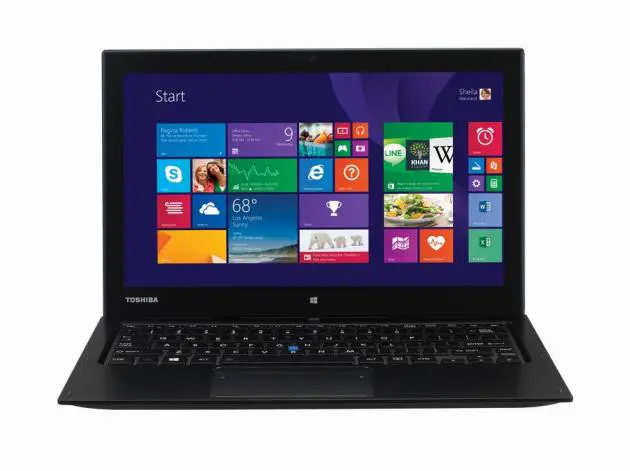
A TOP-OF-THE-LINE ultraportable notebook/tablet computer from Toshiba with powerful business performance, the Portege Z20T-A105 is optimised for business users who require productivity on the go combined with serious security features.
Sleek and slim with a lightweight magnesium chassis and battery life of up to 16 hours, the Portege Z20T has an elegant black finish and operates silently.
As the top of the Z20T series, the A105 is powered by Intel Core M-5Y71 1.2GHz (BGA). It has the option of running on Windows 7 Professional or Windows 8.1 Pro.
The one we tested ran on Windows 7 Professional and had good performance thanks to its eight gigabytes onboard DDR3 working memory or RAM (Random Access Memory) and 256 GB Solid State Drive. The large memory ensures the notebook/tablet can run multiple applications at the same time without any hiccups while the SSD drive makes it fast to fetch and store data.
Graphics horsepower comes from an Intel HD Graphics 5300 chipset that shares the onboard memory for the graphics memory.
Its 12.5-inch Full HD IPS touch-screen display features vibrant, clear detail with wide viewing angles, which is useful when presenting content to several people at the same time. The display’s anti-glare feature is perfect for the business user, as it reduces reflection and works as well under office lights as outside.
The Z20T-A105 has three modes of usage. It comes in the laptop mode with the display connected to the keyboard module. When you detach the display, it becomes a tablet computer. When you reconnect the display but reverse it so that the display is pointing outwards, it’s in the presentation mode.
When docked, the tablet benefits from longer battery life and extra connectivity options on the keyboard. In the laptop mode, the battery can run for an impressive 16 hours by combining the charge in both the tablet and keyboard – ideal for use on long haul flights and negating the need to re-charge at the end of every day.
When used as a tablet, the battery life will provide a full working day’s use of up to 8 hours. As a tablet, the A105 weighs 730g and is just 8.8mm thin. As a laptop, it weighs 1.51kgs and is 21mm thick.
A Wacom digitizer is provided as an extra and can be detached it from a dedicated slot on the tablet corner. It offers superb hand-writing recognition so you can take notes and draw diagrams quickly and clearly in meetings. After use, you move it back to the slot.
The Z20T-A105 provides extensive options to connect to all the peripherals a business user might need.
In tablet mode, you will have a micro HDMI port, micro USB port and microSD slot for connecting to additional screens and fast data transfers.
When it is attached to the keyboard, you can make the most of additional connectivity without any need for adapters. The keyboard module provides an RGB VGA port, a full-size HDMI port, a GBit LAN port and two USB 3.0 ports.
The A105 also comes with the fast Wi-Fi connection of 802.11 ac protocol and supports previous protocols of 802.11 a/b/g/n.
For business security, the A105 offers a number of advanced features designed to keep critical data safe including Toshiba’s EasyGuard suite. It has Trusted Platform Module (TPM) for safeguarding the data in local storage, and the provided Intel Active Management Technology (AMT) allows the IT department to monitor, maintain, repair, update and upgrade machines remotely.
Toshiba says the A105 has passed several rigorous tests to meet Toshiba’s quality standards – including the HALT (Highly Accelerated Lifestyle Test) by independent German test institute TUV Rheinland, such as drop testing up to 76 cm. A Cable lock port is available, which secures the keyboard to desks or other fixed points and ensures the tablet can’t be detached either when docked.
During the test, I found that the touch screen was responsive, especially to the digitizer that you can hover over the screen.
I tested Microsoft Office 365 |on the laptop and the applications ran fast and smooth.
Video files and music files played well. The music sounded good with DTS Studio Sound technology.
The laptop took about 27 seconds to start up and 20 seconds to shut down. (Windows 7 has longer startup and shutdown times than Windows 8.1). The A105 got a high performance score when benchmarked with Windows 7’s internal benchmark tool.
On the scale of 1.0 to 7.9, it got 7.9 for the data transfer score and 7.7 for memory operations, 6.7 for processor performance and 6.5 for graphics performance.
Portege Z20T-A105 retails for Bt88,500, VAT included.
Key Specs
- Operating System: Windows 8.1 Pro 64-bit or, Microsoft Windows 7 Professional (32bit/64bit)
- Processors: Intel Core M 5Y71 1.2GHz
- Graphics: Intel HD Graphics 5300
- Display: 12.5-inch Full HD (1920 x 1080), 300 NIT, IPS |display with 10-finger |capacitive touch support and Wacom digitizer
- Storage: 256GB SSD
- Memory: 8GB LPDDR3 1600MHz onboard
- Connectivity: Tablet – 1 x micro-HDMI, 1 x micro USB, 1 x microSD, combined audio jack, Laptop – full size RGB, HDMI, |2x USB 3.0, cable lock port
- Communication: Wi-Fi 2x2 |ac + ac/a/b/g/n, Bluetooth 4.1, GBit LAN (on keyboard), optional 3G/4G combo |module3
- Cameras: Full HD front facing webcam with 5 MP rear facing camera
- Security: Toshiba EasyGuard, Trusted Platform Module 1.2, Intel Active Management Technology
- Battery life: Laptop – up to |16 hours (w/ 2nd battery supported on dock); Tablet only – up to 8 hours
- Dimensions: Laptop – 309 x 215.2 x 21 mm; Tablet only – 309 x 199.9 x 8.8 mm
- Weight: Laptop – from 1.51kg; Tablet only – from 730g
- Warranty: 3-year carry-in International Limited Warranty (parts & labour), 1-year battery (carry-in)
