
Lighting-speed streaming, no strings attached


Play
Check out this Wi-Fi wireless router from Linksys, which hooks up every device in the house for truly remote control
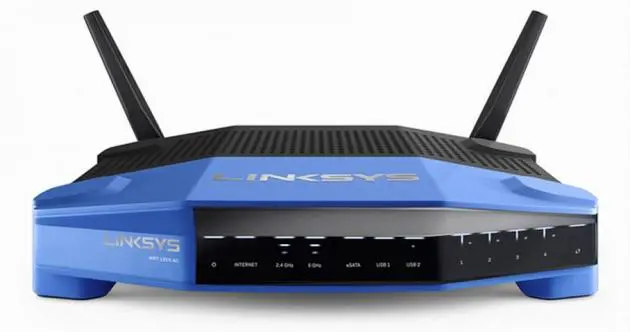
WITH A HEFTY CPU, technology to pull in the latest and fastest protocol formats and just two antennae, the WRT1200AC from Linksys smart Wi-Fi wireless router is a sure bet for improving your connections to the world.
The dual-band router can simultaneously connect at 2.4 and 5GHz to deliver a stronger connection at a wider range than a single band at speeds up to 1,200 Mbps. It handily deals with IEEE 802.11ac wireless protocol, the newest and fastest available – you can connect in 400Mbps at 2.4GHz and in 867Mbps at 5GHz.
The two adjustable antennae and a powerful dual-core CPU ensure those lightning connection speeds and top performance, the latter further enhanced by Beamforming technology, which also reduces interference by focusing the wireless signal to your connected devices.
The WRT1200AC is based on Linksys’s best-selling WRT54G router, using open-source technology that allows knowledgeable users to apply open-source firmware for extra modifications. Developed for use with the Linux-based OpenWRT operating system, the router offers a welcome additional layer of customisation.
Like the WRT54G, the gear has a nice retro look, but it’s updated with the wireless-Act technology. The 802.11AC is great with streaming HD video. Wireless-AC protocol is increasingly being used in new TV sets, Apple and Google TV devices, the latest set-top boxes, smartphones (like the Samsung Galaxy S6), notebook computers, tablets, and the PS4 and Xbox One game consoles.
Both the two-antenna WRT1200AC and this one are powered by a 1.3GHz dual-core ARM processor that can handle multiple data streams simultaneously without having to switch between them, as on a standard single-core processor. This means more efficiency and better performance for our multi-device times.
With two ports – a USB3.0 and a dual eSATA/USB 2.0 – the WRT1200AC is made for multimedia content and video streaming. You can connect an external hard drive full of high-definition videos and stream them to a smart TV or computer anywhere in the house. The router automatically becomes a media server without the need for any complex coding.
Connect your printer to the USB 2.0 port and install the USB Control Center application (previously known as Cisco VUSB) on your computer to print files without actually hooking up the printer. That translates into pure convenience when you’re working elsewhere in the house. As well, the router’s four Gigabit Ethernet ports are 10 times faster than a Fast Ethernet port.
Setting up the router is a breeze. I ran the provided Internet cable from the Internet port at the back to my Linksys X3500 modem/router LAN port (disabling the X3500 router function first). Then you use the default wireless name or SSID (service set identifier) and password, both provided in the quick-start guide. Next, go to LinksysSmartWiFi.com on your browser and you can start the automatic setup. I didn’t have to input any technical data, just my True Internet user name and password. The setup software even detected a newer version of the firmware used and offered to download and install it.
You can have different SSIDs for the 2.4 and 5GHz bands, but I opted to use the same SSID from my disabled router, thus reconnecting all my wireless devices to the WRT1200AC without having to adjust their settings.
Like other Linksys Smart Wi-Fi routers, the WRT1200AC has a “guest mode” so your friends can connect with it for their own Internet use, though their access to your home network is obviously limited.
Once the setup finished, I used my computer to register the router with my Linksys Smart Wi-Fi account, making it a cloud router that I can monitor, maintain and control from a Web browser away from home or by using the Smart Wi-Fi mobile app. This way I can prioritise devices or websites for video streaming and online gaming, monitor network activity and speed, and turn Wi-Fi access on or off for any connected device.
The Network Map tool in Smart Wi-Fi provides a visual overview of all devices on your network, including online status and signal strength, and measures the bandwidth they’re using at any time. You can create individual names for each device for easy identification.
Despite having two antennas instead of the WRT1900AC’s four, I could pick up the router signal throughout my two-storey house. On the rooftop – equivalent to a third floor – the wireless signal indicator dropped from five marks to one, but the Internet was still useable. In my second-floor bedroom the signal was at four marks.
Testing the router, I downloaded several folders totalling 1.32GB from a flash drive attached to the USB 2.0 port of the router to my wirelessly linked Lenovo notebook computer. It took all of one minute and eight seconds.
Linksys WRT1200AC retails for Bt6,900, VAT excluded.
Key Specs
- Platform compatibility: Windows XP, Windows Vista 32/64, Windows 7 32/64, Windows 8 32/64, Windows 8.1 32/64, Mac OS X 10.5.8 Leopard, Mac OS X 10.6.1 Snow Leopard, Mac OS X 10.7 Lion, Mac OS X 10.8 Mountain Lion, Mac OS X 10.9 Mavericks
- Operating temperature: 0 to 40 degrees C
- Operating humidity: 10 to 80 per cent non-condensing
- Maximum link rate: 867Mbps
- LEDs: Power, Internet, Ethernet (1-4), Wi-Fi Protected Setup, 2.4GHz, 5GHz, USB1, USB2
- Network standards: IEEE 802.11a , IEEE 802.11b, IEEE 802.11g, IEEE 802.11n, IEEE 802.11ac
- Radio frequency bands: 2.4 and 5GHz
- Storage temperature: |Minus-20 to 60 degrees C
- Ports: Power, Internet, Ethernet (1-4), USB 3.0, USB 2.0 / eSATA combo
- Buttons: Reset, Wi-Fi Protected Setup, Power
- UpnP: Supported
- Security features: WEP, WPA, WPA2, Radius
- Security key bits: Up to 128-bit encryption
- Storage file system support: FAT, NTFS, and HFS+
- Browser support: Internet Explorer 8 or higher, Firefox 4 or higher, Google Chrome 10 or |higher, and Safari 4 or higher
- Dimensions: 246 x 194 x 52 mm
- Weight: 833g
