
Working out with a pal


Play
A great music player, the iPod Nano keeps tabs on your health as you go about your daily round
THE LATEST IN Apple’s series of iPods, the nano is a compact portable digital music player with good quality sound that also displays photos and plays video clips and can be used as a fitness tracker too.
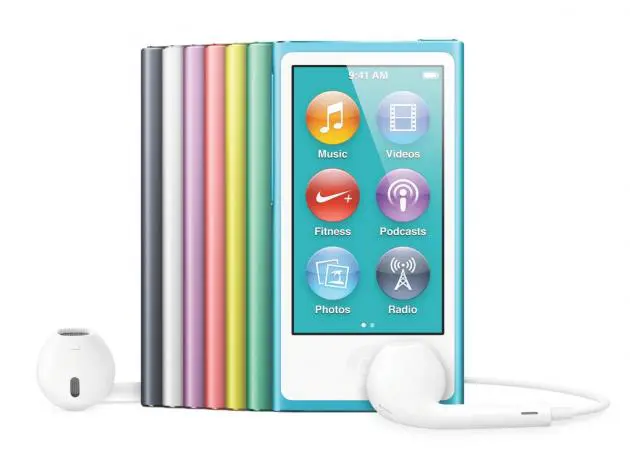
The iPod nano comes in a smooth anodised aluminium design. A skinny 5.4mm and weighing a mere 31 grams, it slides easily into a pocket without causing a bulge.
The digital music player comes in choices of gold, silver, blue, pink and space grey as well as red. And like with the iPod shuffle, reviewed here last week, Apple gives a portion of the purchase price of any red nano to the Global Fund to fight Aids in Africa.
The iPod nano is easy to use with its 2.5-inch multi-touch display that boasts 240 x 432-pixel resolution at 202 pixels per inch. The screen also displays album cover during play.
You swipe the screen right or left, up and down to flip through your music and can browse by genres, composers or your own playlists. Give the iPod nano a shake and it reshuffles to a different song in your music library.
The music player also has the Genius function. When you hear a song you like, you can tap Genius to find other songs like it on your iPod nano and generate a Genius playlist. You can also tap Genius Mixes to find music you have not heard for awhile.
The iPod nano has minimum design with only a few buttons – power, home, volume buttons and play/pause. The play/pause button is located in the middle of the volume rockers.
Apart from digital music, iPod nano can play video clips. It supports H.264 video at the resolution of 720 x 576 pixels and MPEG video up to 2.5 Mbps at 720 x 576 pixels.
The iPod nano also has Bluetooth connection for linking to Bluetooth headphones or Bluetooth speaker. It also has a built-in FM tuner and helpfully displays the station name.
You can also use the nano as your perfect workout partner because it supports Nike+ and has a built-in pedometer.
You need to enter your height and weight and you can use the music player to track your steps, distance, pace, time, and calories burned. At the end of your workout, use iTunes to sync iPod nano to nikeplus.com to track your daily activity and goals, check your NikeFuel, and monitor your fitness progress against yourself and your friends.
You also need iTunes to transfer music files to the nano.
The iPod nano comes with good-quality Apple EarPods. Apart from MP3 of up to 320 kbps format, iPod nano also supports Apple Lossless Audio Codec (ALAC) format and high-resolution uncompressed WAV format. During the test, I found that the iPod nano played good quality music with details and solid bass coming clearly through the EarPods.
I was particularly impressed at the quality when playing ALAC and high-resolution WAV formats of songs on the iPod nano using Sony's Hi-Res MDR-1ABT.
Apple’s iPod nano has 16 gigabytes of storage. It retails for Bt5,900.
Capacity: 16 GB
Display: 2.5-inch Multi-Touch display with 240-by-432-pixel resolution at 202 pixels per inch
Wireless: Bluetooth 4.4, Nike+ supports
Frequency response: 20Hz to 20,000Hz
Audio formats supported: AAC (8 to 320 Kbps), Protected AAC (from iTunes Store), HE-AAC, MP3 (8 to 320 Kbps), MP3 VBR, Audible (formats 2, 3, 4, Audible Enhanced Audio, AAX, and AAX+), Apple Lossless, AIFF, and WAV
Video formats supported: H.264 video: 720 by 576 pixels, 30 fps; MPEG-4 video: up to 2.5 Mbps, 720 by 576 pixels, 30 fps
FM Radio: Regional settings for Americas, Asia, Australia, Europe, and Japan
Sensor: Accelerometer
Battery: Built-in rechargeable lithium-ion battery, up to 30 hours of music playback time
Dimensions: 76.5 x 39.6 x 5.4 mm
Weight: 31g
System Requirements: Mac: USB 2 or 3 port, OS X v10.7.5 or later, and iTunes 12.2 or later; PC: USB 2 port, Windows 7 or later, and iTunes 12.2 or late
