
Headset reads your surroundings


Play
The Jabra Motion's sensors adjust its volume according to the noise in the room
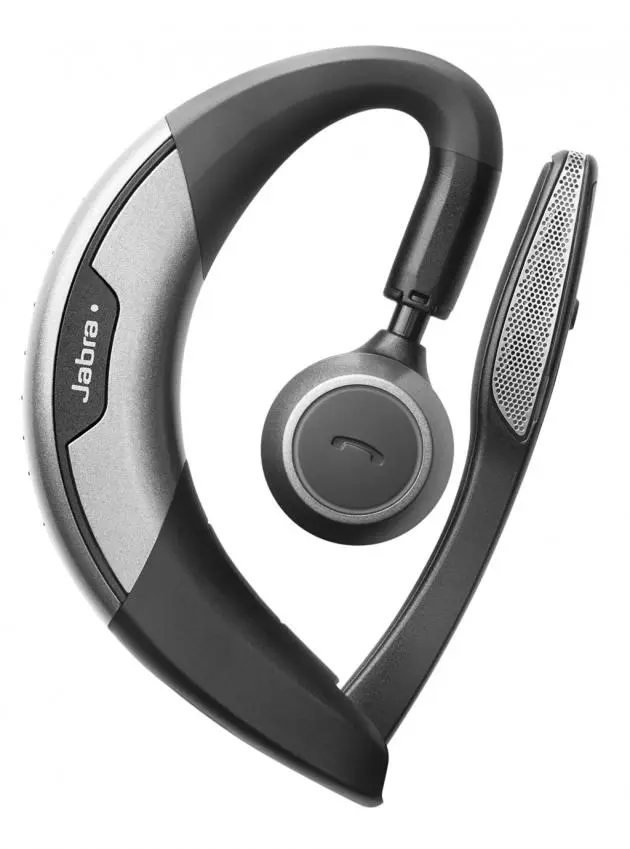
Jabra Motion is a sleek and ergonomically designed Bluetooth headset with smart motion sensing feature. It has a curved design to easily fit around your ears and delivers good voice quality thanks to Noise Blackout 3.0 system using dual microphones to eliminate noise.
Jabra Motion has a call button over its ear piece for receiving or hanging up, a volume touch-sensitive panel, a micro-USB port for recharging, a NFC zone, and a flip boom-arm whose tip houses dual microphones.
The headset is called Motion because it features intelligent motion sensors applied in various functions. For example, when the flip boom-arm is open, you can answer the call by simply picking up the headset from the desk and placing it over your ear.
The headset also uses motion sensors together with its Intelligent Volume Control to adjust the speaker volume depending on the current motion of the users and the sounds of the surrounding environment. For example, the speaker volume is automatically increased on an active call while you are walking or entering a noisy environment.
The motion sensor controls are enabled from the factory.
The feature can be disabled by using Jabra Connect app for iOS or Android smart phone.
The motions of the flip boom-arm are also used for controlling various functions of the headset.
For example, when you close the flip boom-arm, the headset will enter the power saving mode, which is called Power Nap.
You can use the flip boom-arm together with the call button to pair your mobile phone with the headset manually.
You need to press the call button while opening the flip boom-arm and releasing the call button when the Bluetooth light flashes blue.
But the easiest way is to connect automatically using the NFC (Near Field Communication) assistance. You simply tap your NFC-enabled mobile phone gently at Motions’ NFC zone, and your phone will seek your permission to connect to Jabra Motion. I managed to connect it to Sony Xperia Z1 easily using NFC connection.
Jabra motion also supports connecting to the second phone by using Jabra Connect app.
Jabra Motion can also handle multiple calls. For example, you can press and hold the call button to switch between two calls.
The headset also supports voice commands. You can activate the voice command functions by pressing and holding the Voice/Mute button while opening the flip boom-arm. Among the voice commands are Answer for answering incoming call, Ignore for rejecting incoming call, and Redial for redialling the last number dialled.
Jabra Motion delivered good quality voice during the test and effectively cut off wind noises while I was riding my bicycle.
It retails for Bt4,290 and it is available at Jaymart, iStudio, Life, PowerMall, PowerBuy, TG Fone and leading stores nationwide.
Key specs
_ Weight: 17.5g
_ Dimensions: L 53.5mm x W 16mm x H 24mm
_ Microphones: 2 Omni-directional microphones with Jabra Noise Blackout technology
_ Speaker: Micro dynamic, 14.8mm
_ Operating range: Up to 100m (300 feet), Class 1
_ Bluetooth version: 4.0
_ Paired devices: Up to 8 stored devices, 2 connected devices at same time
_ Supported Bluetooth profiles: A2DP (v1.6), Hands free profile (v1.6), Headset profile (v1.2)
_ Talk time: Up to 7 hours, up to 5.5 hours (with Busylight on)
_ Pairing passkey or PIN: 0000
